
Operational Investigations
Reconstructing what happened when an account is disputed, a unit is unaccounted for, or a number does not look right.
The investigation path
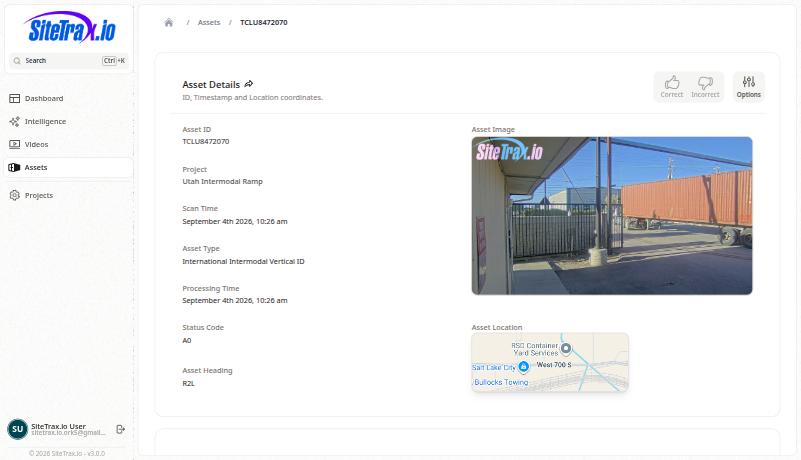
- Start with the identifier. Open Assets, widen the date range beyond the window you think you need, and search for the unit.
- Open the record. Check the scan time against the processing time, the project, the direction and the status code.
- Look at the image. Confirm that the identifier in the image matches the reading and that its time and project support the claimed movement.
- Go to the recording. Open Videos and match on time and project when a still is not enough.
- Record the outcome. If the reading does not match the image, mark the record Incorrect.
The full payload
Exact detection detail exposes the stored capture payload and metadata, including identifier text, type, timestamps, camera, coordinates, confidence and media links where present and permitted. Use the numeric detection ID to inspect that specific record; the equipment identifier can match many observations. Treat stored values as evidence to review rather than proof that every field is complete or correct.
From an assistant
Using SiteTrax.io, show me records that may require review today.
Using SiteTrax.io, list every observation of container TCLU8472070 in the last 60 days with project, direction and time.
For an exact record, ask the assistant to show its saved audit feedback and supporting image or video metadata. For an analytical result, ask for the records or inferred visits that explain it, with pairing and coverage limitations. Reading existing feedback is supported through MCP; mark a reading Correct or Incorrect in the application.
Ask the assistant to distinguish a record page from the complete set. Saved feedback is returned newest first and may span several pages. Sequence explanations can show contributing visits, their stage records, and non-success event decisions. If the analytical result version changed before the supporting records were retrieved, refresh the aggregate so the figures and evidence refer to the same result.
For repeated-identifier investigations, anomaly checks provide coarse multi-source and short-average-gap groups. Use the supported consecutive-observation gap query for exact adjacent-gap questions. Neither a repeated identifier nor a short gap alone proves duplicate equipment.
Watch out for
- Distinguish processing outcomes from operational events. A failed or questionable read does not establish its cause. Before treating an unexpected site as an operational event, confirm the identifier, project, timestamp, direction interpretation and available image.
- Scan time and processing time are different. Asset analysis uses scan time when available, with creation time as the fallback for older records. Video analysis uses video creation time. Identify that basis before comparing records.
- Media can be withheld. Project configuration, retention, permissions or redaction can withhold an image while still returning the operational metadata. Missing media does not mean a missing record.
No comments to display
No comments to display