
How SiteTrax.io Data, Workflows and Agents Fit Together
Two flows answer different needs: SiteTrax.io can push processed data to a configured destination, and a connected assistant can request authorized information when a user asks a question. Enabling one flow does not configure the other.
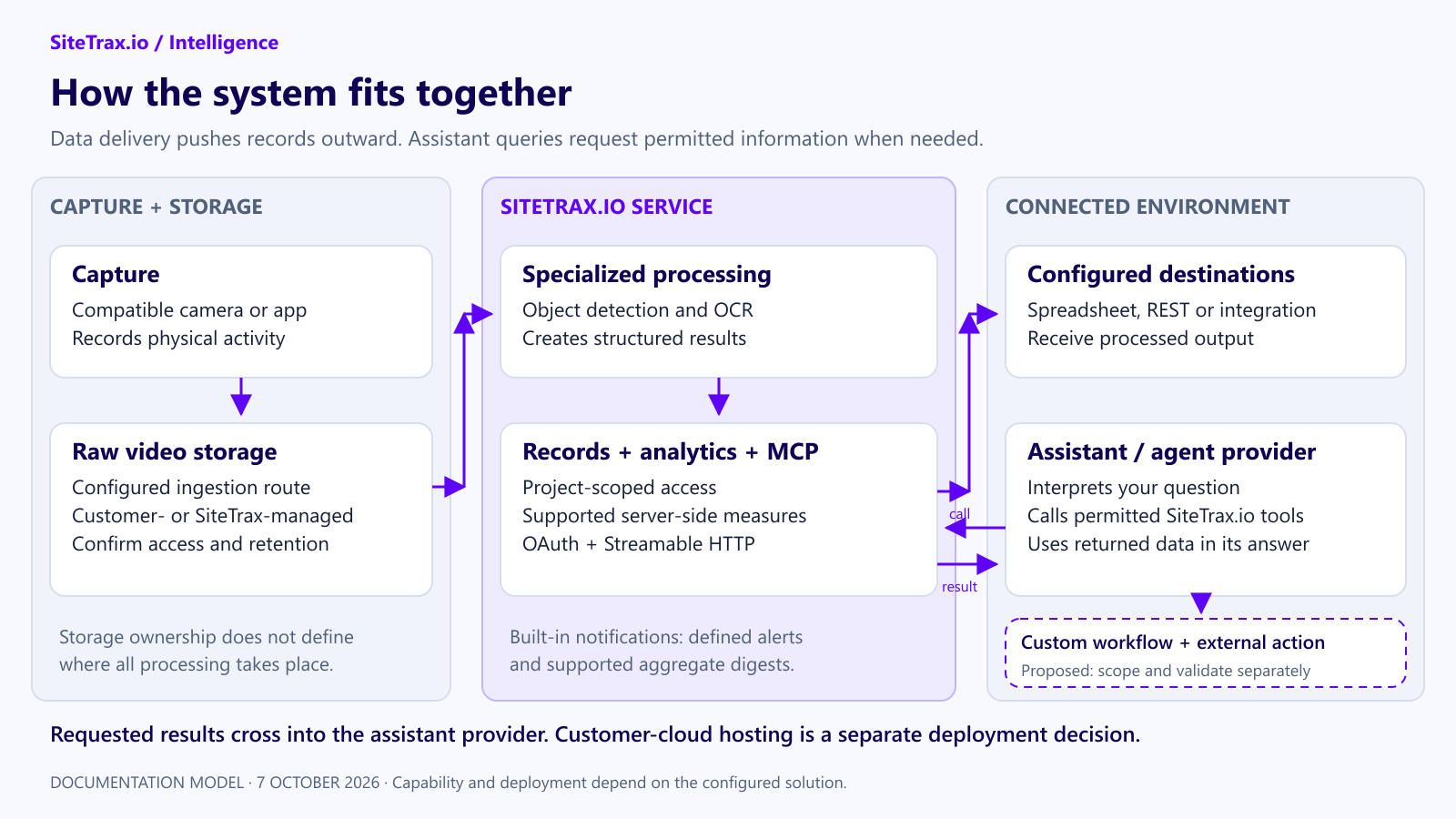
System
Capture and create data
A compatible camera or capture app records equipment. The documented video-ingestion route uses configured object storage. Follow the storage-provider section for the supported service and upload requirements. SiteTrax.io processes the capture with its specialized detection and identifier-reading models, then stores operational results. The foundation model in your assistant is not required to perform this identifier extraction.
Push data to an existing system
Configured project integrations can send output to a spreadsheet, a REST endpoint or an integration platform. This is a data-delivery route. Your receiving application decides how to use it. See Organization Configuration and API Output (JSON).
Ask an assistant to retrieve and explain data
- You ask a question in a connected assistant.
- The assistant calls SiteTrax.io tools through the remote MCP endpoint.
- SiteTrax.io applies the authenticated account’s project permissions and the requested filters.
- SiteTrax.io retrieves records or calculates a supported aggregate.
- The authorized result returns to the assistant provider for the response.
SiteTrax.io remains the source of the operational record. Query-time access sends the returned data to the chosen provider; it is not a promise that data stays entirely within a customer cloud. The deployed endpoint uses Streamable HTTP and OAuth. See MCP Server.
Run a workflow
Documented built-in notification workflows watch for new matching detections or send supported aggregate digests. A broader workflow that reads another system, evaluates a business rule and writes a result needs separate design and authorization. Choose the runtime, credentials, approval rules and support owner before deployment.
Confirm responsibility before implementation
| Component | Responsibility to establish |
|---|---|
| Camera and site | Customer and SiteTrax.io agree coverage, installation and support responsibilities. |
| Raw capture storage | Confirm whether the bucket is customer-managed or SiteTrax-managed, plus access, retention and cost. |
| SiteTrax.io processing and records | SiteTrax.io supplies its processing service, records, supported analytics and access controls. |
| Assistant | Customer selects an approved provider and account. Provider policies govern its handling of returned results. |
| Custom workflow runtime | Name the cloud project owner, billing owner and support owner in the implementation scope. |
| External write actions | Name the destination, permitted actions, approval rule, audit record and failure recovery. |
Data ownership, hosting location, access permissions and provider data handling are separate questions. A cloud provider’s certifications do not by themselves certify a SiteTrax.io deployment.