
SiteTrax.io API - Output (JSON)
The SiteTrax.io output API delivers structured asset observations to a configured REST endpoint. Capture and upload happen first; processing extracts identifiers and observation metadata; the configured integration then delivers JSON records to your system.
This guide is for developers receiving those records. Agree the destination endpoint, authentication and delivery behavior with SiteTrax.io before implementation.
From capture to output
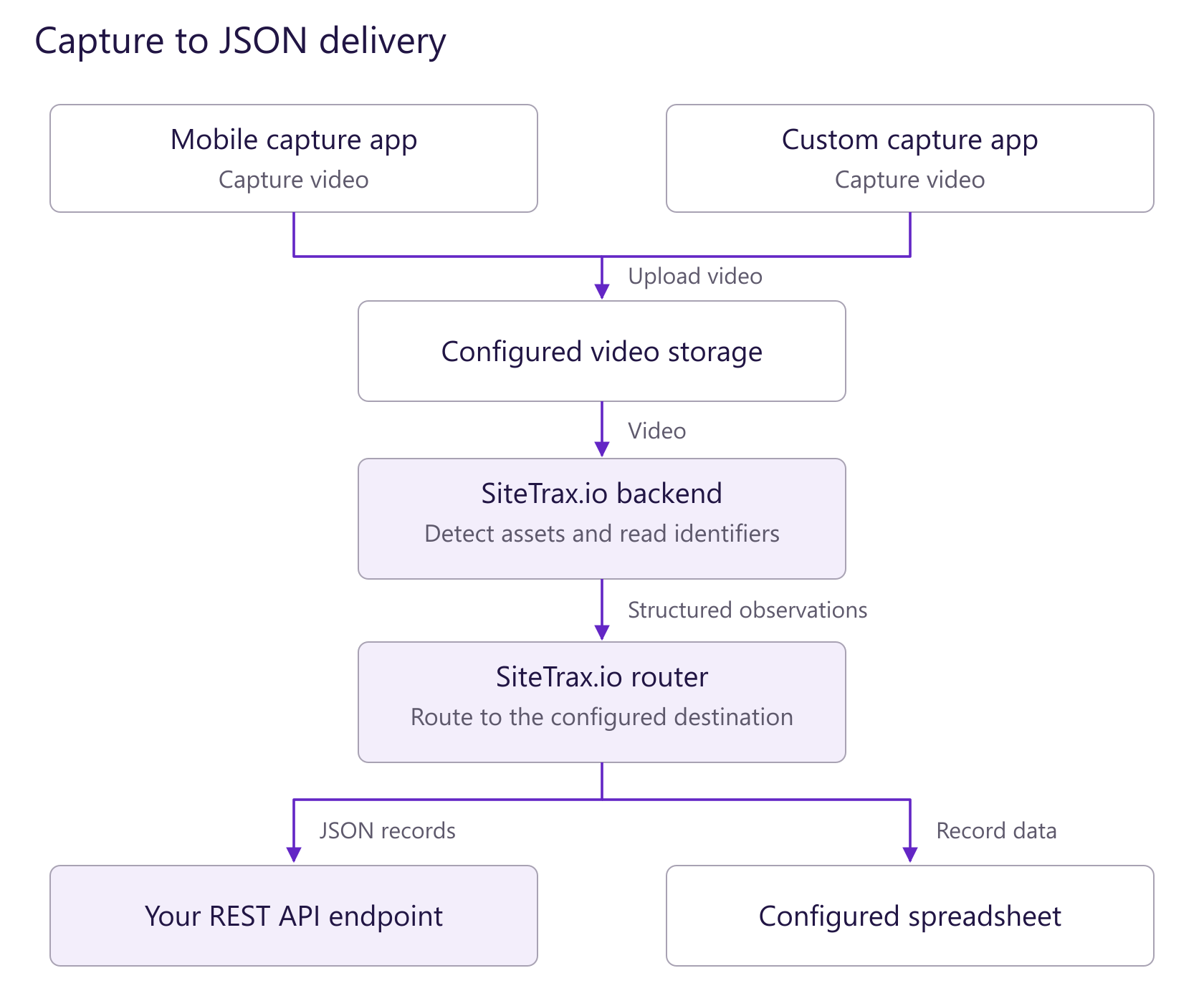
Open the capture-to-JSON flow at full size. The REST endpoint is the destination covered by this guide. A configured spreadsheet is an alternative delivery destination. Storage and destination setup are documented in their dedicated provider sections.
- Capture a supported video and deliver it through the configured ingestion path. See the dedicated storage provider setup and video specifications.
- SiteTrax.io processes the video into asset observations.
- The configured output integration pushes the resulting records to your REST endpoint. Validate one known capture end to end before relying on the integration.
For a test environment, use the provider-specific test setup. Request deployment details through SiteTrax.io Support.
Output - REST API
The orientation of output JSON is in records format. These records represent each detected asset and its metadata. These records of a single video are sent in series one after another. Samples of each type of record are given below.
International Intermodal Shipping Container ID
{
    "video_name": "video24-05-07_09-43-03-39_01424",
    "type": "International Intermodal Vertical ID",
    "text": "TRBU5341840",
    "datetime": "2024-05-07T13:43:43.701000Z",
    "datetime_original": "2024-05-07T13:43:43.701000Z",
    "datetime_digitized": "2024-05-07T13:43:43.701000Z",
    "gps_lat": 30.4178413846,
    "gps_lon": -81.5642421112,
    "container_company": "CJ DARCL LOGISTICS LIMITED",
    "container_country": "India",
    "status": "Success",
    "status_code": "A0",
    "asset_image": "https://d11isnr6z7061v.cloudfront.net/video24-05-07_09-43-03-39_01424_TRBU5341840.jpg",
    "asset_heading": "R2L",
    "camera": "B8A44F9E3A9E",
    "feedback": "https://app.sitetrax.io/feedback/ZWNlMmMyOTAtMWVlMi00NDQ2LTgyOGQtMTRiYzliODc4NGFiL1RSQlU1MzQxODQwLzg1MzI5MA"
}
Example compatibility: These historical payload examples contain differences in field casing and status-field availability across asset types. Confirm the exact schema and status semantics against your configured output before implementing a parser. The examples are not a versioned schema contract.
International Intermodal Shipping Container Chassis
{
	"video_name": "6519_20230731T115236880Z_s00",
	"type": "Mounted Chassis ID",
	"text": "NEXQ422124",
	"datetime": "2023-07-31T23:52:51.900000Z",
	"datetime_original": "2023-07-31T23:52:36.000000Z",
	"datetime_digitized": "2023-07-31T23:52:36.000000Z",
	"gps_lat": 33.7994263,
	"gps_lon": -118.2270262,
	"container_company": "-",
	"container_country": "-",
	"status": "Could not find Asset ID in provided asset list.",
	"status_Code": "I4",
	"asset_image": "https://container-thumbnails-public.s3.amazonaws.com/6519_20230731T115236880Z_s00_NEXQ422124.jpg",
	"asset_heading": "R2L",
    "camera": "B8A44F9E3A9E",
    "feedback": "https://app.sitetrax.io/feedback/YTM1MDhjOTYtZTY5Mi00ZTlkLWE3NTMtYTM2ZWUxNmNlNTliL05FWFE0MjIxMjQvNTE1OTg3"
}
Shipping Container and Chassis
{
    "video_name": "video24-05-07_09-43-03-39_01424",
    "type": "International Intermodal Vertical ID",
    "text": "TRBU5341840",
    "datetime": "2024-05-07T13:43:43.701000Z",
    "datetime_original": "2024-05-07T13:43:43.701000Z",
    "datetime_digitized": "2024-05-07T13:43:43.701000Z",
    "gps_lat": 30.4178413846,
    "gps_lon": -81.5642421112,
    "container_company": "CJ DARCL LOGISTICS LIMITED",
    "container_country": "India",
    "status": "Success",
    "status_code": "A0",
    "asset_image": "https://d11isnr6z7061v.cloudfront.net/video24-05-07_09-43-03-39_01424_TRBU5341840.jpg",
    "asset_heading": "R2L",
    "stacking": "314875212301145617478946594181356160171_000_000",
    "camera": "B8A44F9E3A9E",
    "feedback": "https://app.sitetrax.io/feedback/ZWNlMmMyOTAtMWVlMi00NDQ2LTgyOGQtMTRiYzliODc4NGFiL1RSQlU1MzQxODQwLzg1MzI5MA"
}
Generic Text Asset Tracking
{
    "video_name": "video24-05-07_09-43-03-39_01424",
    "type": "Generic OCR",
    "text": "TRBU5341840",
    "datetime": "2024-05-07T13:43:43.701000Z",
    "datetime_original": "2024-05-07T13:43:43.701000Z",
    "datetime_digitized": "2024-05-07T13:43:43.701000Z",
    "gps_lat": 30.4178413846,
    "gps_lon": -81.5642421112,
    "container_company": "CJ DARCL LOGISTICS LIMITED",
    "container_country": "India",
    "status": "Success",
    "status_code": "A0",
    "asset_image": "https://d11isnr6z7061v.cloudfront.net/video24-05-07_09-43-03-39_01424_TRBU5341840.jpg",
    "asset_heading": "R2L",
    "camera": "B8A44F9E3A9E",
    "feedback": "https://app.sitetrax.io/feedback/ZWNlMmMyOTAtMWVlMi00NDQ2LTgyOGQtMTRiYzliODc4NGFiL1RSQlU1MzQxODQwLzg1MzI5MA"
}
Each record has a variety of metadata to track and localize an asset across the globe. There are also status codes included in international intermodal shipping container records to represent how sure we are of each input container.
API Reference
| Field | Type | Description |
|---|---|---|
|
|
|
Name of the video in which container was detected. |
type |
str |
Type of detected asset ID. (Horizontal of Vertical) |
text |
str |
Detected asset ID. |
datetime |
str |
Time in ISO8601 of when the camera was passing in front of the asset. (This should be used as the timestamp for thirdparty applications) |
datetime_original |
str |
Time in ISO8601 of when the video was created. |
datetime_digitized |
str |
Time in ISO8601 of when the video was digitized. |
gps_lat |
float |
Latitude of detected asset in decimal format. |
gps_lon |
float |
Longitude of detected asset in decimal format. |
container_company |
str |
Company associated with the container. For more information please check BIC database. (International Intermodal Exclusive Entry) |
container_country |
str |
Country of the company. (International Intermodal Exclusive Entry) |
status |
str |
Verbal description of the container entry detection status. (International Intermodal Exclusive Entry) |
status_code |
str |
Return code associated with the status of the entry. (International Intermodal Exclusive Entry) |
asset_image |
str |
A public URL to the image of the asset that we are trying to track. |
asset_heading [optional*] |
str |
Specifies the asset direction within the camera frame. R2L: Asset moving from right to left. L2R: Asset moving from left to right. |
|
str | [Deprecated] [Replaced by below field] If more than one processing type is selected, this field is populated. Users can sort the records via this field to match assets that may pair together. |
|
str | For containers and chassis detection. This field pairs a container record with it's corresponding chassis record. |
|
str |
Unique serial number of the camera. Only available to virtual gate applications. |
| feedback [optional*] | str |
A unique URL specific to every record that can be used to give feedback and share the record with anyone. |
Status Codes (International Intermodal Exclusive)
| Code | Description |
|---|---|
| A0 | No errors were detected for the container entry. |
| A1 | Check digit of the entry is interpolated. |
| I1 | BIC repository cannot verify the company of the container. |
| I2 | Check digit of the container cannot be verified. A record containing this code can be classified as incorrect right away. |
| I3 | We detected the container but its ID cannot be determined. This can be due to damaged or scratched ID or the asset might not be a standard asset. |
| I4 | The provided database of assets does not contain the listed asset. |
| I5 | When processing for both container and chassis is selected, if there is no container for a chassis because it is a bare chassis then the entry for that missing container will have this status code. |
| I6 | Low confidence detection. |
| I7 | Low confidence detection. ID has been interpolated. |
The status code, status text, country and company are only available for international intermodal shipping container IDs. For chassis ID and generic text detection, these entries are not available.
Generating Test Sample Data
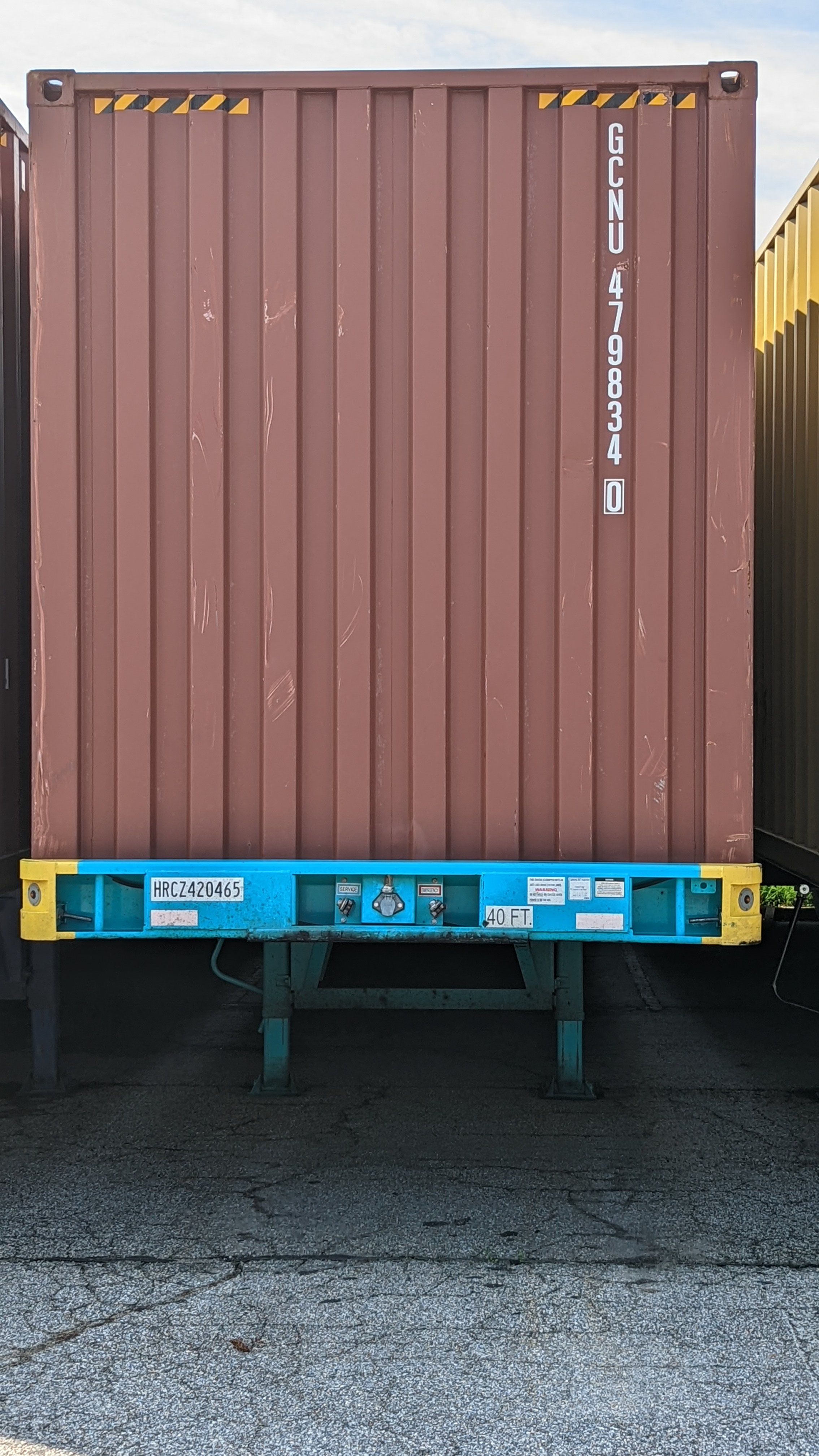
We recommend using SiteTrax.io directly to generate test data. This can be done by scanning a picture of an intermodal containers to trigger events whenever you wish. It is recommended to scan a complete container so that the object detection and first identify the container and then scan the ID.
Preparing test data to be pushed to you for testing:
- Locate an Android 10 or later device
- Register for a free SiteTrax.io account - https://www.sitetrax.io (Click Register)
- Download the SiteTrax.io Android app (link provided after registering your account above).
- Scan an international intermodal container and/or chassis.
- View the results in a configured output destination.
Next, use the one or more images of containers on a full screen computer and scan the ISO numbers. Make sure to have the whole object in frame and make sure the picture is taking up the entire screen. Below are some sample images (click to view in a New Window in your web browser).
Sample Image #1 - International Intermodal Container:
Sample Image #2 - Multiple International Intermodal Containers:
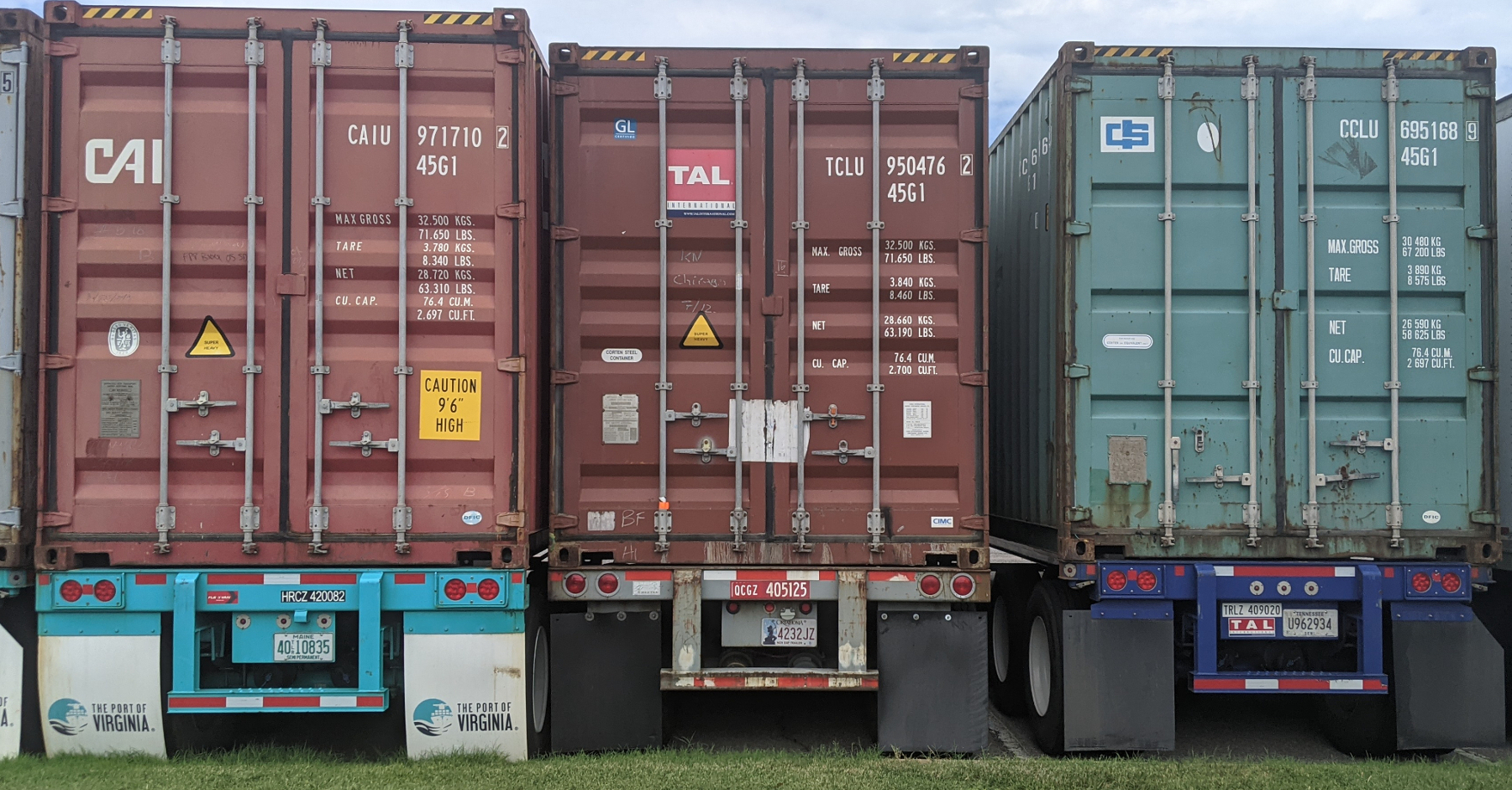
Use the images above in a full screen monitor to test scan with the Android app. The data should push to the spreadsheet that you set up to see the sample payload within a spreadsheet when you registered.
Reviewing the Data:
Please visit https://www.sitetrax.io and login to the SiteTrax.io Intelligence if you need to troubleshoot or monitor what you scanned (along with the results). A sample JSON payload is also available with each record in the SiteTrax.io Intelligence if needing to troubleshoot further.
NOTE: The default settings for free accounts is typically limited to 100 scans per month and scanning one asset (or image) at a time. If you wish to scan continuously with the app, please submit a support ticket at our support page.
Custom Endpoint: When you're ready to have live data pushed to your endpoint, please submit a support ticket at our support page and supply your registered username and project to request that the data is sent to your webhook destination.
Troubleshooting
If records from a video do not show up please check our status page or if all services are up then please submit a support ticket at our support page.
No comments to display
No comments to display