
Detention Analysis

Checking detention and per diem exposure against what was actually observed, rather than accepting an invoice on trust.
What SiteTrax.io contributes
SiteTrax.io supplies the measured part: observed entry and exit times forand alinks unit,to the underlying detection records, with animages imagewhere behind each.available. Where the site configurationboundaries, equipment identity and available observations support it,pairing, SiteTrax.io performsserver-side sequence and duration analysis on the server and returnsestimates the interval between definedthose operationalobservations. boundaries.It also reports incomplete and ambiguous observations that could affect the interpretation.
It does not calculate your liability. Free time, rate and basis are commercial terms, which is why the profile interview asks for them.
Set up the inputs
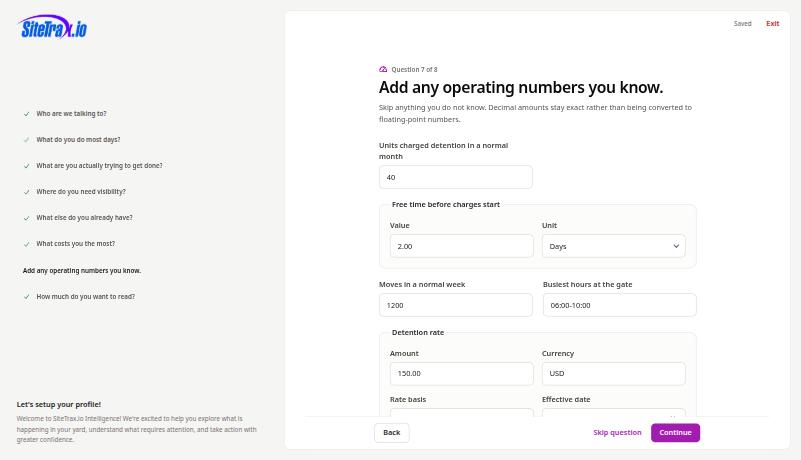
Select detention and per diem as a cost area in question six of the interview. Question seven then expands to collect units charged in a normal month, free time before charges start with its unit, the rate with currency and basis, and an effective date. Decimal amounts are stored exactly.
Once those are published, the Intelligence hub shows detention exposure with a status. In a profile where the rate answers are complete but capture has not been confirmed on both boundaries, it reports that the inputs are ready and asks you to verify elapsed-time coverage first.
From an assistant
Using SiteTrax.io,
showanalyzethecompletedobservedcontainertimevisitsbetween gate-in and gate-out for containersending at the Utah siteoverin the last 30days,days. Confirm the gate pair, eligible container types, timezone and maximum valid visit duration with me. Show average, median and p90 duration, then list contributing visits longer than two days with their detection links and anyunitincomplete-observationthat exceeded two days.limitations.
Ask for the supporting records whenever the result will be used to challenge a charge.
Use one equipment family per calculation and a site-appropriate maximum visit duration; the maximum is a pairing assumption, not a free-time allowance. A new retained entry for the same identifier supersedes an earlier open visit. Visits without a valid completion are reported separately, so an open visit must not be presented as a completed dwell measurement.
Median (p50) describes the middle completed visit; p90 describes the duration within which 90% of completed visits finished. Neither percentile describes visits still open at the observation cutoff. Camera-to-camera time does not establish contractual availability, release, custody transfer or the chargeable period in an invoice.
Watch out for
- An observed interval is a measurement, not an explanation. It establishes how long passed between two observations, not why.
PairingInspectmustpairingbe reliable.quality.WhereA duration is reported for eligible completed visits; unmatched, expired, superseded or still-open visits are accounted for separately. Missing boundaries can prevent arequiredcalculation,pairingwhileisincompleteunavailable,observationsSiteTrax.iocanreportsmaketheanlimitationotherwiseinsteadvalid result unrepresentative ofproducingalla number. Treat that as a coverage finding.traffic.- Your commercial terms are context, not verified evidence. The rate you entered is what you told SiteTrax.io, and it is stored as customer-supplied context.
- Verify before you dispute. Open the underlying records and check the images.
SiteTrax.io reports observations and intervals. Decisions about billing, liability and contract terms remain yours.