
What is SiteTrax.io Intelligence?
SiteTrax.io Intelligence is the layer ofthat uses SiteTrax.io thatoperational turnsdata capturedto yardanswer questions, run supported workflows, and gategive connected AI assistants and agents access to the evidence behind their work. Start with a practical question: when was this trailer last seen, what activity intowas answersrecorded at this site, or which observations need review?
SiteTrax.io creates the underlying data from camera captures. Intelligence makes that data useful in an operational task. Your chosen assistant interprets the request and uses authorized SiteTrax.io tools; SiteTrax.io retrieves the records and calculates supported analytics.
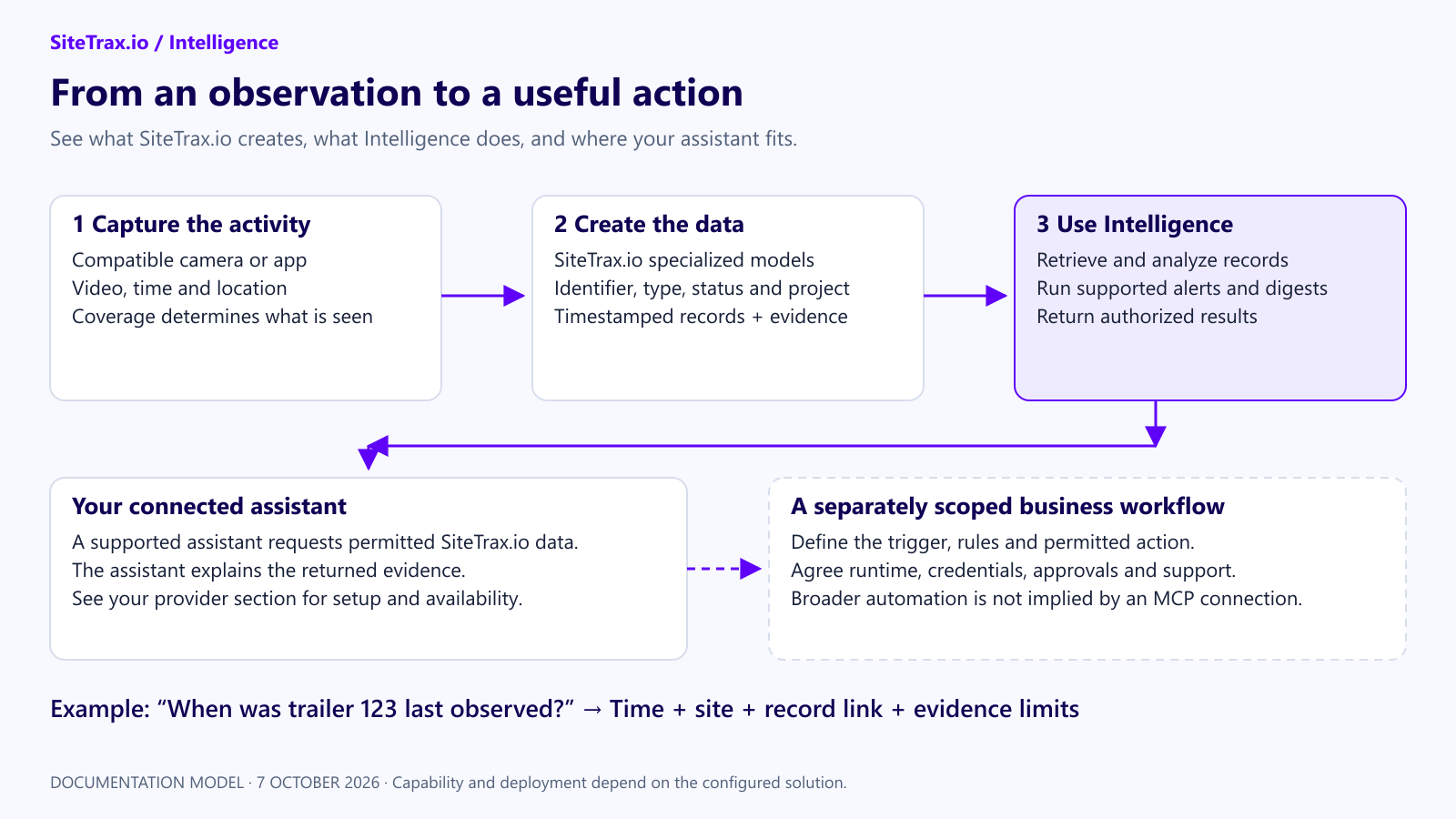
From a physical observation to an operational result
Choose the job you need done
Workflows and agents have different roles
A workflow follows defined steps and conditions. An agent uses a model to interpret a task and choose among tools it has permission to use. MCP is the connection through which a compatible assistant or agent discovers and calls SiteTrax.io tools. MCP itself is neither an AI model nor a background automation service.
Current documentation covers detection alerts and aggregate email digests. It does not establish a general-purpose service that autonomously updates your TMS, dispatches equipment, issues invoices or disputes charges. Those use cases require an agreed implementation.
Where you work
Use app.sitetrax.io to review records, configure projects and throughuse the personalized Intelligence hub. Connect an assistant to ask operational questions in that assistant. Publishing a personal profile enables the normal personalized hub when Intelligence is enabled; it is optional for ordinary authorized assistant connections to the SiteTrax.io MCP server.queries.
A profile supplies selected published facts and priorities. It does not automatically configure your assistant, activate monitoring or grant project access.
What itmakes doesan answer useful
SiteTrax.ioAsk camerasfor the asset identifier, observation time and capturetimezone, appsproject, providesupporting recordsrecord ofand activityany missing evidence. A latest observation tells you where a unit was seen at gates,that yards,time. rampsCurrent presence requires adequate coverage and docks.additional Processing stores result rows for supported equipment such as containers, chassis, trailers and trucks, with available timestamps, project, status, heading and media links.evidence. A stored result row is not alwaysnecessarily aone physical unit or one successful identifierread.
Start orwith anone independentverifiable answer
Follow the setup instructions in your provider’s dedicated section, then ask:
Using SiteTrax.io, list the projects I can access. Then help me find the latest observation of aphysicaltrailerunit.identifiernot
IntelligenceIsitsprovide,onwithtopitsoftimestamp,thattimezone,recordproject andhelpssupportinginrecord.fourDoways.create
Itorholdschange anything.
For a profilecustom ofworkflow, yourcontact operation.SiteTrax.io Awith profileone interviewoperational captures your work, goals, visibility needs, costs and response preferences. Confirmed answers are published as a profile revision. A connected assistant can retrieve selected facts and priorities when relevant;problem, the public profile response excludessite, the saved working brief, custom instructions and response-style preferences.
Where to find it
Sign in at app.sitetrax.io and select Intelligence in the left navigation.
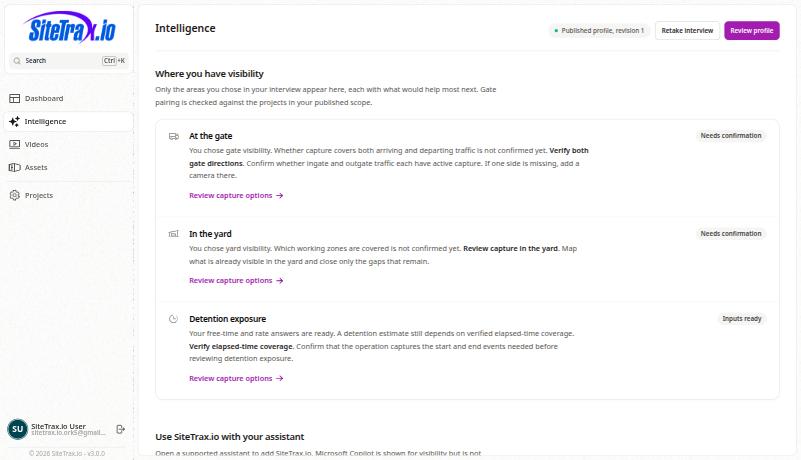
When Intelligence is enabled, its navigation item appears after you publish a profile for your account. Until then, the interview is the native setup entry point. See Accessing SiteTrax.io Intelligence. You can also connect an assistant directly without publishing a profile; ordinary MCP access requires an active, email-verified account and separate authorization.
What it is not
Documentation that referredwant to service.sitetrax.io describes the retired portal. The current application is app.sitetrax.io.take.