
What is SiteTrax.io Intelligence?
SiteTrax.io Intelligence is the layer that uses SiteTrax.io operational data to answer questions, run supported workflows, and give connected AI assistants and agents access to the evidence behind their work. Start with a practical question: when was this trailer last seen, what activity was recorded at this site, or which observations need review?
SiteTrax.io creates the underlying data from camera captures. Intelligence makes that data useful in an operational task. Your chosen assistant interprets the request and uses authorized SiteTrax.io tools; SiteTrax.io retrieves the records and calculates supported analytics.
System architecture
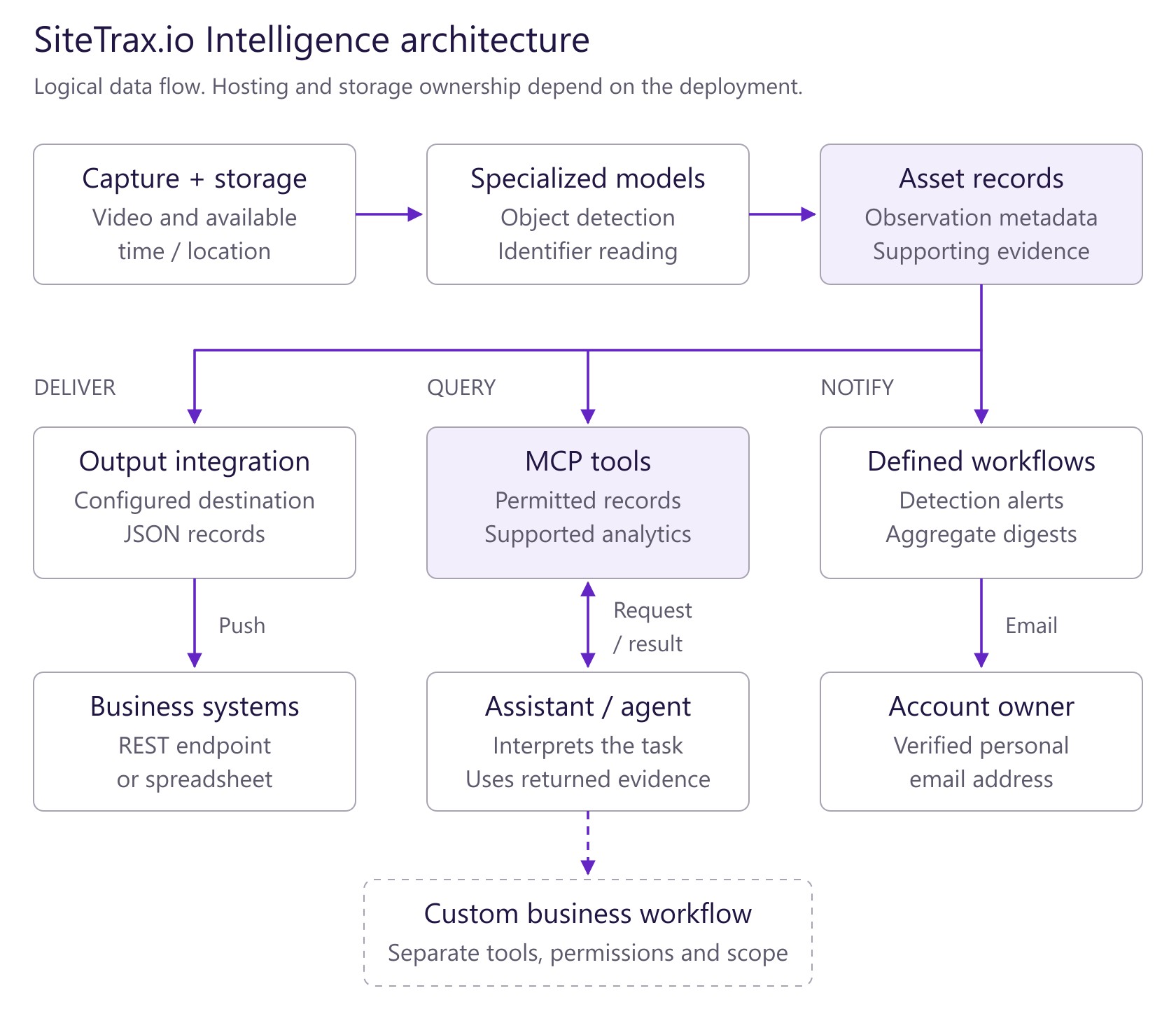
Open the architecture diagram at full size. Solid arrows show documented paths; dashed boxes and arrows show separately scoped workflows. These are logical responsibilities, not a claim about physical hosting.
SiteTrax.io’s specialized models extract identifiers from captured imagery. A connected assistant’s foundation model interprets the user’s task, requests permitted SiteTrax.io results and explains the evidence. Broader actions require their own workflow, tools and permissions.
From a physical observation to an operational result
| Layer | What happens | What you receive |
|---|---|---|
| Capture | A compatible camera or capture app records equipment. | Video and available capture time and location. |
| SiteTrax.io data | Specialized processing reads supported identifiers and stores the results. | Records containing identifier text, type, status and project, with timestamps and evidence where available. |
| Intelligence | SiteTrax.io tools retrieve observations, calculate supported measures and run supported notifications. | An answer, analysis, detection alert or scheduled digest within the documented limits. |
| Connected assistant or agent | A validated assistant or agent client calls permitted tools and explains their results. | A response tied to the projects your account can access. Additional business actions need their own integration and permissions. |
Choose the job you need done
- Find a unit: ask for its latest observation, time, site and supporting record.
- Understand activity: request counts, trends or eligible completed-visit durations with the filters and evidence.
- Watch for a new detection: create a supported alert to your verified account email, or an expectation watch that reports which listed units have not arrived by a deadline.
- Receive a routine summary: schedule a digest of a saved query, optionally with an AI-written summary.
- Act in another business system: define the trigger, destination and permitted action with SiteTrax.io before treating it as an available workflow.
Workflows and agents have different roles
A workflow follows defined steps and conditions. An agent uses a model to interpret a task and choose among tools it has permission to use. MCP is the connection through which a compatible assistant or agent discovers and calls SiteTrax.io tools. MCP itself is neither an AI model nor a background automation service.
Current documentation covers detection alerts, expectation watches, and scheduled or interval email digests. It does not establish a general-purpose service that autonomously updates your TMS, dispatches equipment, issues invoices or disputes charges. Those use cases require an agreed implementation.
Where you work
Use app.sitetrax.io to review records, configure projects and use the personalized Intelligence hub. Connect an assistant to ask operational questions in that assistant. Publishing a personal profile enables the normal personalized hub when Intelligence is enabled; it is optional for ordinary authorized MCP queries.
A profile supplies selected published facts and priorities. It does not automatically configure your assistant, activate monitoring or grant project access.
What makes an answer useful
Ask for the asset identifier, observation time and timezone, project, supporting record and any missing evidence. A latest observation tells you where a unit was seen at that time. Current presence requires adequate coverage and additional evidence. A stored result row is not necessarily one physical unit or one successful read.
Start with one verifiable answer
Follow the setup instructions in your provider’s dedicated section, then ask:
Using SiteTrax.io, list the projects I can access. Then help me find the latest observation of a trailer identifier I provide, with its timestamp, timezone, project and supporting record. Do not create or change anything.
For a custom workflow, contact SiteTrax.io with one operational problem, the site, the destination system and the action you want to take.
No comments to display
No comments to display