
What is SiteTrax.io Intelligence?
SiteTrax.io Intelligence is the layer of SiteTrax.io that turns captured yard and gate activity into answers you can act on. It is available within the current SiteTrax.io experienceapplication at app.sitetrax.io, and itthrough replacesauthorized assistant connections to the legacySiteTrax.io serviceMCP portal.server.
What it does
SiteTrax.io capturescameras whatand physicallycapture happensapps provide records of activity at gates, yards, ramps and docks. CamerasProcessing andstores captureresult appsrows readfor thesupported identifiersequipment onsuch as containers, chassis, trailers and trucks, with available timestamps, project, status, heading and storemedia eachlinks. readingA withresult row is not always a timestamp,successful identifier read or an independent observation of a direction,physical a project, a processing status and an image.unit.
Intelligence sits on top of that record and doeshelps threein things.four ways.
- It holds a profile of your operation.
AnAeight-questionprofile interview captures your work, goals, visibility needs, costs and response preferences. Confirmed answers are published as a profile revision. A connected assistant can retrieve selected facts and priorities when relevant; the public profile response excludes the saved working brief, custom instructions and response-style preferences. - It reviews your coverage. The native hub uses the areas you selected and available project configuration to identify useful next steps. It distinguishes confirmed inputs from coverage that still needs your confirmation. These informational cards do not prove complete capture or activate a persistent monitoring workflow.
- It provides assistant access. After you authorize a supported assistant through OAuth, that assistant can query the SiteTrax.io data your account is allowed to read. The hub provides setup links; operational conversation and tool use take place in the assistant.
Where to find it
Sign in at app.sitetrax.io and select Intelligence in the left navigation.
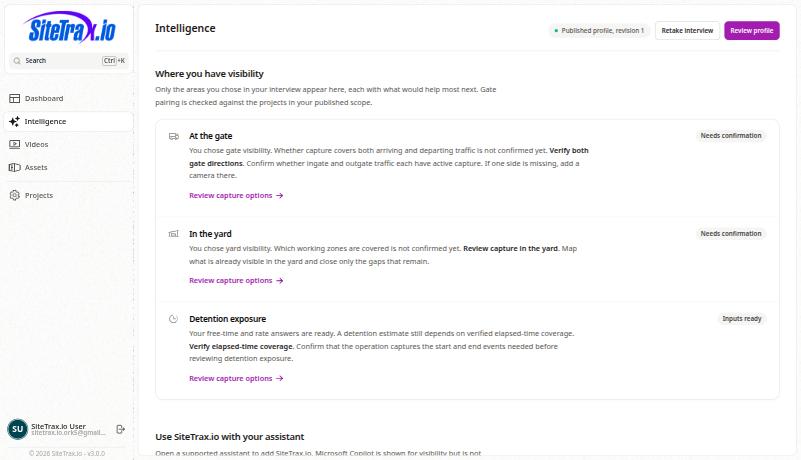
When Intelligence is enabled, its navigation item appears after you publish a profile for your account. Until then, the interview is the native setup entry point. See Accessing SiteTrax.io Intelligence. You can also connect an assistant directly without publishing a profile; ordinary MCP access requires an active, email-verified account and separate authorization.
What it is not
- It is not a second copy of your data. Intelligence
readsqueries the same SiteTrax.io records the rest of the application uses.ThereMCPisaccessnodoes not require a separatewarehousebulk synchronized warehouse, but requested results are sent toreconcile.the assistant provider you authorize. - It does not replace the SiteTrax.io record. SiteTrax.io remains the system of record. Operational results can be checked against their supporting observations, times and projects. Image availability depends on project permissions, retention and redaction; profile answers are customer-supplied context.
- It is not a forecasting engine. Intelligence reports what was observed and the intervals between observations. It does not assert why an interval happened.
Documentation that referred to service.sitetrax.io describes the retired portal. The current application is app.sitetrax.io.