
Enabling Intelligence

What has to be true before a team gets value from Intelligence, in the order it makes sense to do it.
1. Confirm the accounts
Everyone who needs Intelligencetheir needs aown SiteTrax.io account, with email verification completed before authorizing an external assistant. Share the projects they need. An account andcan atauthorize leastMCP onewithout a published profile, but useful operational answers require shared project.projects; Withoutan aempty project therelist is nothingnot initself scope,an andauthentication thefailure.
2. Confirm the capture
Intelligence reports what was observed. Before rollout, settle whether each gate has capture on both directions and which yard zones are covered. Doing this first prevents a team concluding the product is wrong when the real finding is a blind spot.
3. Have each person publish a profile
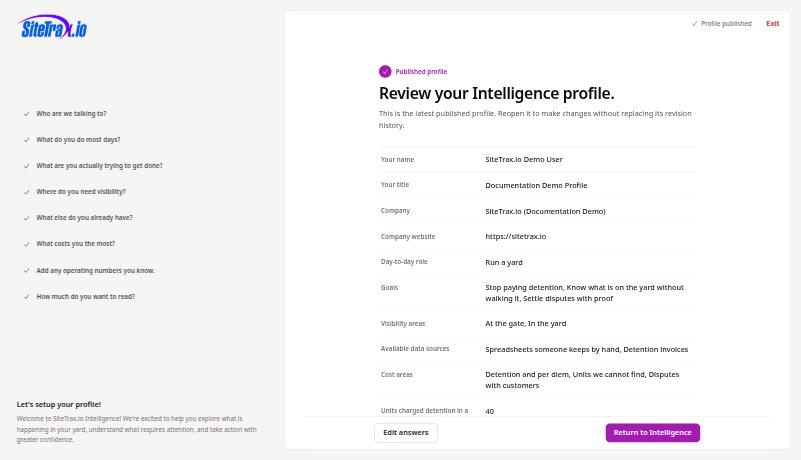
The personalized Intelligence hub becomes available to an account once that account publishes the eight-question interview.interview Itand Intelligence is self-service and takes a few minutes.enabled. Until thenpublication, the normal hub route opens the interview and the Intelligence navigation item doesis nothidden. appearThis inportal thatsetup personis navigation.independent of OAuth: people can connect a supported external assistant and query their shared projects without publishing a profile.
Ask people to answer honestly rather than aspirationally. The interview asks what costs them the most and where they need visibility; an accurate answer produces a useful coverage review, and a flattering one does not.
4. Decide the assistant position
Decide whether assistant access is in scope, and which assistant. On Claude Team and Enterprise plans only Owners can add a custom connector; in ChatGPT workspaces an administrator controls whether apps may be added. Settle that before individuals try and fail.
ThenEach decideperson then authorizes their own assistant connection with their SiteTrax.io account. Decide whether anyonethey needsneed to create or cancel alerts and digests; only those changes require the additional notifications write scope. MostListing usersnotifications doand not.delivery history uses read access. The extra permission may be requested initially or later, depending on the client. See Account Access and OAuth and Alerts and Scheduled Digests.
5. Retire the old references
Update runbooks, bookmarks, onboarding material and saved links that point at service.sitetrax.io. The current application is app.sitetrax.io.