
Container Visibility
Checking when and where a container was observed, and reviewing recorded arrivals and departures, without first walking the yard or calling the gate. Current presence depends on the available observations and capture coverage.
In the application
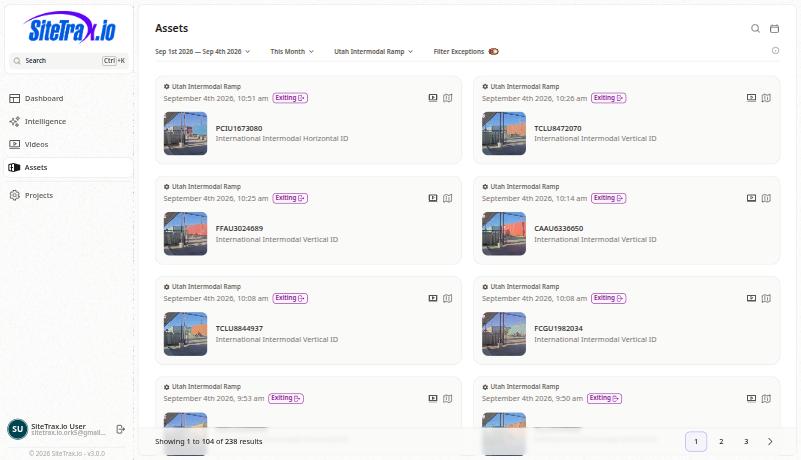
- Open Assets and set the project and date range.
- The gallery lists
eachstoredreadingreadings withitstheirproject,project and time, plus direction information and capturedimage.images where available. - Open a record to see the asset type, status code, heading, coordinates and full payload.
The dashboard gives the same period at a summary level: total assets, containers and chassis for the selected project and range.
From an assistant
Using SiteTrax.io, show
todaytoday's detections at the Utah site by asset type. State the timezone and resolved time window.
Using SiteTrax.io, where was container TCLU8472070 last observed?
Watch out for
CountsDefinearetheofcount. Repeated observations and combined processing can create multiple storedreadings.rowsAforcontaineroneobserved twice in a day produces two records.passage. Ask for distinct usable container identifiers whenyouthatwantisatheunitrelevantcount,measure, andtreatretainthattheastype/statusdistinctfilters.identifierDistinct stored textratheristhannot a guarantee of distinct physical equipment.- A unit with no recent reading is not proven absent. It may be parked outside camera coverage. Check your coverage before concluding a unit has left.
- Direction depends on configuration.
EnteringItandmayexitingbereflectderivedhowfromtheasiterecord'scamerasheadingareorsetassignedup.from a dedicated project or camera. Ask which interpretation was used; a missing heading does not establish entry or exit.