
How Intelligence Uses SiteTrax.io Data

Intelligence does not hold its own copy of your operation. It reads the records SiteTrax.io already stores, applies your published profile as context,stores and returns operational results scoped to the projects your account is permitted to see. The native hub uses your published profile for personal guidance. A connected assistant can retrieve selected published facts and priorities when relevant to a request.
The chain from camera to answer
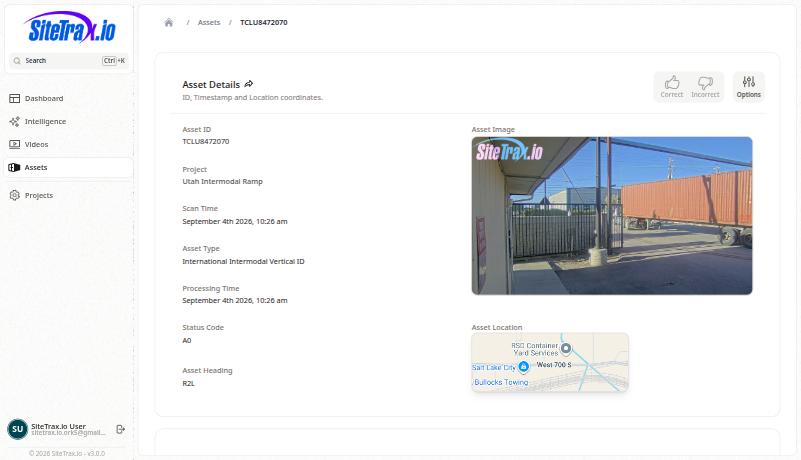
How to read an asset record
Reading these records correctly matters more than any single feature, because a misread record produces a confident wrong answer.
Your profile as context
When you publish the profile interview, SiteTrax.io stores an immutable revision and generates a short working brief fromfor yourreview answers.in Thatthe briefapplication. isThe whatpublic anMCP assistantprofile receivestool asreturns context:a yourcompact role,selection yourof published facts and priorities, thewith costsadditional yousections flagged,available when requested. It does not return the sourcesworking youbrief, alreadycustom have,AI andinstructions theor response response-style youpreferences.
Custom AI instructions areand storedresponse alongsidepreferences can be saved in your profile, but saving them does not configure a connected assistant. Ask for the revisiondesired rathertone thanor mergedlevel intoof explanation in that assistant. Profile retrieval and use depend on the brief.assistant and the question. Your published answers areremain customer-supplied context, not independently verified operational evidence,evidence.
Scope and permissions
Every operational request is limited to the projects currently shared with the authenticated account. Connecting an assistant does not widen SiteTrax.io permissions. IfProjects selected in a projectprofile hasdescribe context; they are not beena sharedseparate withOAuth you,project itgrant. isCurrent notproject insharing scope forremains the applicationaccess orlimit. forSee anAccount assistantaccess actingand onOAuth.
The profile belongs to a specific user account. If you publish a profile in the application but connect an assistant using a different SiteTrax.io account, that assistant will not see the profile. Use the same account on both sides.