
How Intelligence Uses SiteTrax.io Data

Intelligence reads the records SiteTrax.io already stores and returns operational results scoped to the projects your account is permitted to see. The native hub uses your published profile for personal guidance. A connected assistant can retrieve selected published facts and priorities when relevant to a request.
The chain from camera to answer
- Capture. A camera or capture app records video at a gate, in a yard, or on a route.
- Processing. SiteTrax.io reads the identifiers in that video and stores each reading as an asset record with a status code.
- The record. Each record carries the identifier text, the asset type, the project, the scan and processing times, direction of travel, camera, coordinates where available, a confidence value, and a link to the image.
- Intelligence. Aggregations, sequences and exception checks are calculated on the server. An assistant can request published profile context separately when it helps answer your question.
- Delivery. The result is shown in the application, or returned through the MCP server to the assistant provider you connected. Query-time access avoids a separate bulk synchronized index; it still sends the requested results to that provider.
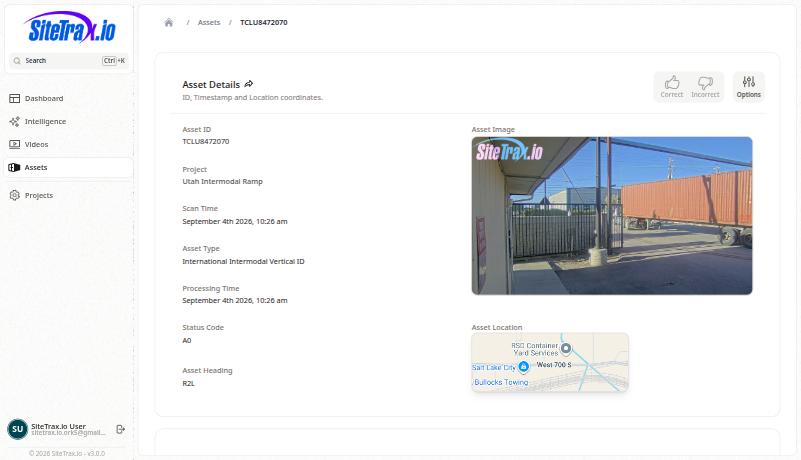
How to read an asset record
Reading these records correctly matters more than any single feature, because a misread record produces a confident wrong answer.
- One record is one stored processing result. It is not guaranteed to be one physical asset or one direct observation. Where container and chassis processing are combined, SiteTrax.io can add a synthetic row for the paired side.
- Identifier text is only usable when it is real text. Blank values and placeholders such as a single dash are not equipment identifiers and must not be treated as one.
- Status code and asset type must be read together. A processing status describes the outcome of reading the image. It is not by itself a statement about the physical condition of the unit.
- Counts mean what they say. A count of records is not the same as a count of distinct units, and a count of distinct identifier values is not a guarantee of distinct equipment.
- Direction is configuration-dependent. Entering and exiting reflect how the site and its cameras are set up.
Your profile as context
When you publish the profile interview, SiteTrax.io stores an immutable revision and generates a working brief for review in the application. The public MCP profile tool returns a compact selection of published facts and priorities, with additional sections available when requested. It does not return the working brief, custom AI instructions or response-style preferences.
Custom AI instructions and response preferences can be saved in your profile, but saving them does not configure a connected assistant. Ask for the desired tone or level of explanation in that assistant. Profile retrieval and use depend on the assistant and the question. Your published answers remain customer-supplied context, not independently verified operational evidence.
Scope and permissions
Every operational request is limited to the projects currently shared with the authenticated account. Connecting an assistant does not widen SiteTrax.io permissions. Projects selected in a profile describe context; they are not a separate OAuth project grant. Current project sharing remains the access limit. See Account access and OAuth.
The profile belongs to a specific user account. If you publish a profile in the application but connect an assistant using a different SiteTrax.io account, that assistant will not see the profile. Use the same account on both sides.