
Core Intelligence Features

The application at app.sitetrax.io provides the profile interview, published revisions, coverage review and operational screens. A connected assistant uses the SiteTrax.io MCP server to query authorized data and perform the supported notification actions described below.
Profile interview
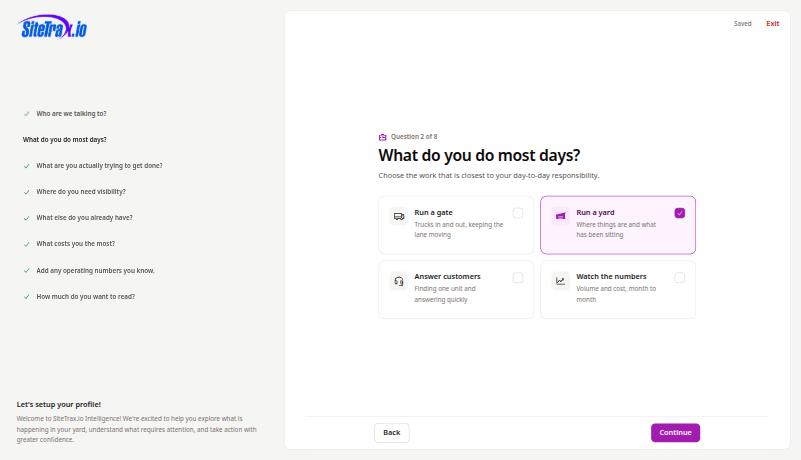
Eight questions that establish who you are, the work you do, what you are trying to accomplish, where you need visibility, what other data you hold, what your gaps cost, any operating numbers you know, and how much explanation you want in a response. Question seven adapts to the cost areas you selected, so a yard that flagged detention is asked for free time and rate.
Published profile revisions
Publishing creates an immutable revision. You can reopen and republish without replacing the history, and your published profile stays active while an edit is in progress. Only answers you explicitly confirmed are included; account-prefilled display values are not silently promoted into stored facts.
Working brief
A short summary of your published answers, stored with the revision and shown in the application. A connected assistant can retrieve a compact selection of published facts and priorities when relevant. The public MCP profile response excludes the working brief, custom AI instructions and response-style preferences. Publication does not guarantee that an assistant retrieves or applies your context.
Coverage review
The Intelligence hub lists the areas you said you need visibility in and states what would help most next, with a status on each card. Gate pairing is checked against the projects in your published scope.
Assistant connections
The hub provides setup entry points for ChatGPT and Claude. Complete the connection in the assistant using an active, email-verified SiteTrax.io account and approve its OAuth access. The hub cards do not confirm installation or successful authorization. A published profile is optional for ordinary authorized MCP queries. See Account access and OAuth.
Operational data surfaces
- Dashboard for volume, asset and scan totals over a period and project.
- Videos for the recordings behind the readings, with the asset count found in each.
- Assets for the gallery of readings, with an exceptions filter.
- Projects for site configuration, user access and integrations.
Record feedback
Each asset record can be marked correct or incorrect from its detail page in the application. A connected assistant can read saved audit feedback for an exact record and retrieve its supporting observation. Submitting or changing record feedback remains an application action.
Server-side analytics
Counts, groupings, sequence analysis and anomaly checks are calculated by SiteTrax.io. An assistant can request an aggregate result without downloading every underlying record, and can request supporting records or inferred visits when an explanation is needed. Results are returned to the chosen assistant provider.
Alerts and scheduled digests
A connected assistant can create a watch for new matching detections, schedule an aggregate email digest, or cancel an existing alert or digest with your confirmation and the additional notification-write permission. Delivery is to your own verified account email. Listing notifications and reading delivery history require read permission only. See Alerts and scheduled digests for supported conditions, schedules and limits.