
Using MCP with SiteTrax.io
Once an assistant is connected and you have verified its project access, this page explains what to ask for and how to phrase it. For setup and permissions, see Account access and OAuth. For tool names and response contracts, see the SiteTrax.io MCP Server reference.
What you can ask for
| If you need to | Ask for |
|---|---|
| Locate one unit | The most recent observation of a specific identifier, with project, time and image |
| Understand a period | Activity across your sites for a date range, with totals and trends |
| Compare | A breakdown by project, camera, asset type, status code or time period |
| Measure dwell | Observed time between defined operational boundaries, such as gate-in to gate-out |
| Find problems | Records meeting review criteria, unreadable results, or unusual volume gaps |
| Check capture health | Camera activity and scan health across your projects |
| Get the evidence | The detection image, video metadata and saved audit feedback for a specific record, or supporting records behind an analytical result |
| Receive a recurring update | A new-detection watch, expectation watch, or scheduled or interval email digest, after confirming its conditions and approving the additional write permission |
| Check an existing notification | Its status and delivery history, using read permission |
How to phrase it
Six things make the difference between a vague answer and a usable one.
- Name SiteTrax.io so the assistant reaches for the connector rather than answering from memory.
- Name the site or project. Without it, the answer spans everything you can see.
- Give a date or time range. This is the single most common cause of a surprising number.
- Say the asset type when it matters, such as containers rather than chassis.
- Confirm the complete identifier when following one unit. Query search supports partial text and prefixes to discover candidates; exact latest-observation and identifier-based image/video lookups need the full identifier.
- Ask for the supporting record whenever the answer will be used in an invoice, a dispute or a report.
A weak prompt
How busy were we?
The same question, answerable
Using SiteTrax.io, summarize container and chassis activity at the Utah site for the last seven days and break the results down by status code and asset type.
Reading the answer honestly
These are the mistakes that turn a good answer into a wrong decision.
- A record is a stored processing result, not a guaranteed physical event. Combined container and chassis processing can add a synthetic row for the paired side.
- A processing status is not a condition report. An unreadable result does not establish that the unit is damaged.
- An observed interval is not an explanation. Time between two camera observations is a measurement, not a cause.
- A USDOT number identifies a carrier, not an individual tractor.
- Missing pairing is reported, not estimated. Where a sequence cannot be paired reliably, SiteTrax.io says so instead of filling the gap.
When the answer will be acted on
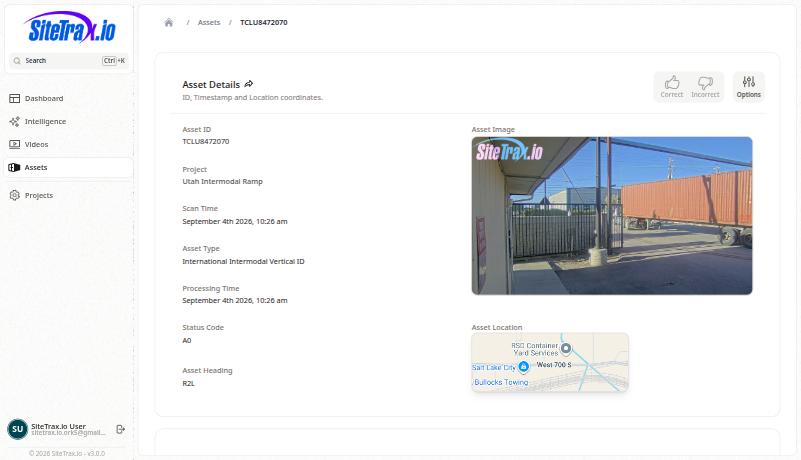
Ask for the record. SiteTrax.io can return a link in the form app.sitetrax.io/dashboard/assets/view/{asset_id}, which opens the same detail page you would reach in the application, with the image and the full payload. Verify there before an invoice is disputed or a charge is paid.
Creating a detection watch or digest, or cancelling one, requires your confirmation and sitetrax:notifications:write in addition to read access. A client may request that additional permission at initial connection or later. Listing notifications and reading history need read access only. See Alerts and scheduled digests.
A connected assistant can retrieve selected published facts and priorities when relevant. The public MCP profile response excludes your working brief, custom instructions and response-style preferences, and publication does not guarantee retrieval or use. Ask directly for the level of explanation you need, such as: give the answer, explain the calculation and link to its supporting records.
No comments to display
No comments to display