
User Management

Access in SiteTrax.io is granted per project. A shared project makes its permitted operational information available to that account; media availability and redaction rules still apply. A project that is not shared with the account remains out of reach. External assistants also need that user whoto has been givenauthorize a projectconnection, canand worknotification withchanges everythingrequire inthe it;additional awrite userpermission.
See who has access
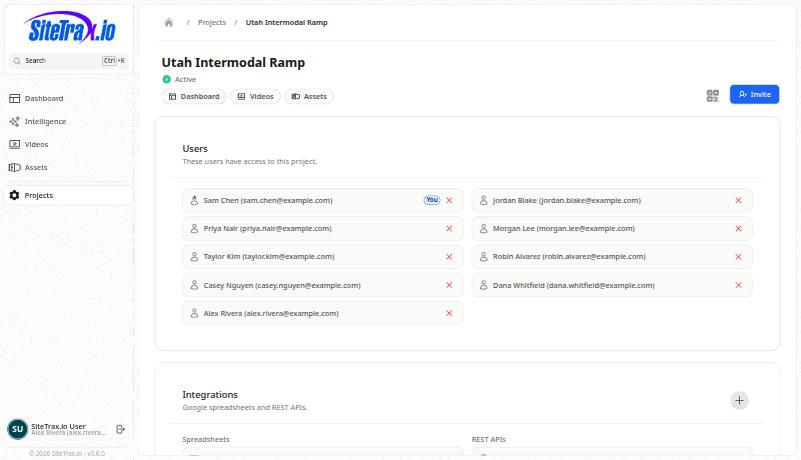
The addresses in this screenshot have been replaced with examples. Your own project will show real accounts.
Add someone
Select Invite on the project and supply the personperson’s address. They will need a SiteTrax.io account,account; andexternal onceassistant invitedauthorization also requires an active account with verified email. Once access is granted, the project appears in their application and in the scopebecomes available to anyan assistant they connect.authorize with that account. Complete account verification before starting the assistant connection.
Remove someone
Select the remove control beside their entry in the Users card. Removing access takes effect for the application and for connected assistants alike, because both resolve against the same project sharing.
Service and integration accounts
Projects commonly carry non-human accounts alongside staff, for automation and testing. Treat them like any other entry: review them periodically, and remove ones that are no longer needed. They carry the same project access as a person.
What to review each quarter
Removing a person from a project also removes theirthat reachproject throughfrom anyfuture connectedauthorized assistant asrequests. well.Project Theresharing isand nodisconnecting separatean assistant are different controls. SiteTrax.io does not currently provide a per-connection revoke screen; see Account Access and OAuth for the available access list to maintain.controls.