Operational Use Cases
Practical workflows for container visibility, yard and gate activity, detention analysis, investigations, asset tracking, customer service and reporting. Use the evidence and interpretation guidance to check answers, and learn how to create detection alerts or scheduled digests to your verified account email.
- Container Visibility
- Yard Operations
- Gate Operations
- Detention Analysis
- Operational Investigations
- Asset Tracking
- Customer Service Workflows
- Executive Reporting
- Alerts and Scheduled Digests
- Workflows and Agents: What Runs Today
Container Visibility

Checking when and where a container was observed, and reviewing recorded arrivals and departures, without first walking the yard or calling the gate. Current presence depends on the available observations and capture coverage.
In the application
- Open Assets and set the project and date range.
- The gallery lists stored readings with their project and time, plus direction information and captured images where available.
- Open a record to see the asset type, status code, heading, coordinates and full payload.

The dashboard gives the same period at a summary level: total assets, containers and chassis for the selected project and range.
From an assistant
Using SiteTrax.io, show today's detections at the Utah site by asset type. State the timezone and resolved time window.
Using SiteTrax.io, where was container TCLU8472070 last observed?
Watch out for
- Define the count. Repeated observations and combined processing can create multiple stored rows for one passage. Ask for distinct usable container identifiers when that is the relevant measure, and retain the type/status filters. Distinct stored text is not a guarantee of distinct physical equipment.
- A unit with no recent reading is not proven absent. It may be parked outside camera coverage. Check your coverage before concluding a unit has left.
- Direction depends on configuration. It may be derived from a record's heading or assigned from a dedicated project or camera. Ask which interpretation was used; a missing heading does not establish entry or exit.
Yard Operations

Reviewing observed yard activity and inferred visits so a supervisor can direct work with a clear view of what the capture does and does not establish.
In the application
- Open Dashboard, set the project and period, and read the asset and scan totals for the shape of the day.
- Open Assets to see individual readings, most recent first.
- Compare arrivals and departures over the same window to understand activity. Their difference is not a count of equipment currently on site: the opening population, repeated readings, pairing and capture completeness all matter.
From an assistant
Using SiteTrax.io, summarize activity at my sites for the last seven days and break it down by asset type and direction.
Using SiteTrax.io, were there any unusual volume gaps at my sites this week?
Using SiteTrax.io, compare inferred trailer occupancy at entry with completed visit durations for this project and period. Confirm the gate pair, timezone and maximum valid visit duration. Show the sample size, average, median and p90 duration by occupancy band, explain incomplete observations and capture limitations, and link the supporting visits.
Use SiteTrax.io server-side sequence analysis for this question. It estimates concurrent observed visits at entry for one equipment family: containers, chassis or trailers. These units must not be relabeled as trucks, and USDOT numbers cannot identify individual visits. Occupancy is inferred from bounded observations and pairing assumptions, not a verified physical inventory. A last observation alone does not prove current presence.
A rise in duration across occupancy bands is an exploratory association. It does not establish that occupancy caused the delay or set a verified yard capacity limit. The analysis can report insufficient samples or withhold a change-point estimate while relevant visits remain incomplete. Review those qualifications before acting on a threshold.
Coverage is the limiting factor
Yard visibility is only as complete as the capture behind it. The Intelligence hub states this directly: if you chose yard visibility in your profile, it will tell you that which working zones are covered is not yet confirmed, and prompt you to map what is already visible and close only the gaps that remain.

Do that exercise before treating a yard count as complete. A zone with no camera contributes nothing to the record, and no amount of analysis recovers it.
Watch out for
- Absence of a reading is not absence of a unit. It is absence of an observation.
- Dwell needs boundaries. Observed durations describe eligible completed visits. Unmatched, expired, superseded and still-open visits are reported separately; gaps in capture can prevent a calculation or limit how representative it is.
- Combined processing adds rows. Where container and chassis are processed together, a synthetic row can be stored for the paired side.
Gate Operations

Keeping the lane moving, and having a record of what came in and what went out.
In the application
- Open Dashboard for the gate project and set the period to the shift or day in question.
- Scroll to recent scans, which lists each reading with its time, identifier, capture type and direction.
- Open Assets and use Filter Exceptions to select records for inspection. Read the type and status together before deciding whether action is needed.
Both directions matter
Dwell analysis needs observations at both the entry and exit boundaries. One camera can support both directions when its placement and configuration capture them reliably. If you selected gate visibility in your profile, the Intelligence hub asks you to confirm whether ingate and outgate traffic each have active capture, and to add a camera where one side is missing.
This is worth settling early. Detention analysis, dwell measurement and dispute evidence all depend on having both boundaries.
Distinguish the gate's designated role from the observed movement. A dedicated inbound project or camera can classify that operational scope; a camera observing both directions requires the record's heading and stored direction mapping. Vertical or missing headings do not establish heading-derived entry or exit. Preserve any conflict between a lane designation and observed reverse movement.
Where projects form an authoritative pair, they must share a non-empty gate group and contain exactly one ingate and one outgate project in your accessible scope. Otherwise, define the stage projects or cameras explicitly. A generic name such as "North Gate" does not establish the role. For duration analysis, use one equipment family and confirm a maximum valid visit duration.
From an assistant
Using SiteTrax.io, break down today's detections at the gate by status code and asset type. State the timezone and resolved time window.
Using SiteTrax.io, what was the observed time between gate-in and gate-out for trailers this week?
Watch out for
- A status code describes a processing outcome. An unreadable identifier does not prove damage; a synthetic missing pair side does not represent another truck. Inspect the type, status and available evidence before drawing an operational conclusion.
- Peak hours are worth recording in your profile. The interview can save your busiest gate hours as customer-supplied context. Include the hours and timezone directly in an assistant question when the calculation depends on them; saved profile context is not guaranteed to be retrieved or applied.
- Identifier text can be a placeholder. Blank values and single-dash entries are not equipment identifiers.
Detention Analysis

Checking detention and per diem exposure against what was actually observed, rather than accepting an invoice on trust.
What SiteTrax.io contributes
SiteTrax.io supplies observed entry and exit times and links to the underlying detection records, with images where available. Where the site boundaries, equipment identity and observations support pairing, server-side sequence analysis estimates the interval between those observations. It also reports incomplete and ambiguous observations that could affect the interpretation.
It does not calculate your liability. Free time, rate and basis are commercial terms, which is why the profile interview asks for them. With terms you state, or terms confirmed in your published profile, it can estimate chargeable time, and amounts when you give a rate, as a range of three bounds. See Estimate exposure under your terms.
Set up the inputs
Select detention and per diem as a cost area in question six of the interview. Question seven then expands to collect units charged in a normal month, free time before charges start with its unit, the rate with currency and basis, and an effective date. Decimal amounts are stored exactly.

Once those are published, the Intelligence hub shows detention exposure with a status. In a profile where the rate answers are complete but capture has not been confirmed on both boundaries, it reports that the inputs are ready and asks you to verify elapsed-time coverage first.
From an assistant
Using SiteTrax.io, analyze completed container visits ending at the Utah site in the last 30 days. Confirm the gate pair, eligible container types, timezone and maximum valid visit duration with me. Show average, median and p90 duration, then list contributing visits longer than two days with their detection links and any incomplete-observation limitations.
Ask for the supporting records whenever the result will be used to challenge a charge.
Use one equipment family per calculation and a site-appropriate maximum visit duration; the maximum is a pairing assumption, not a free-time allowance. A new retained entry for the same identifier supersedes an earlier open visit. Visits without a valid completion are reported separately, so an open visit must not be presented as a completed dwell measurement.
Median (p50) describes the middle completed visit; p90 describes the duration within which 90% of completed visits finished. Neither percentile describes visits still open at the observation cutoff. Camera-to-camera time does not establish contractual availability, release, custody transfer or the chargeable period in an invoice.
Estimate exposure under your terms
Using SiteTrax.io, estimate detention exposure for completed and open container visits at the Utah gate pair in the last 30 days. Our free time is 2 days, charged per started day at $75 per container; these are my stated terms. Show the floor, likely and ceiling bounds with the terms and their source, and list the open visits that make up the difference.
SiteTrax.io will not produce an estimate without stated free time and a source for those terms: either you state them in the conversation, or they come from your confirmed profile. It then reports three bounds:
- Floor. Chargeable time from completed visits observed both in and out.
- Likely. Adds still-open visits whose identifier was read repeatedly with no near match. Their charges are still accruing.
- Ceiling. Adds every other unfinished visit, including expired visits (usually a missed exit read), which are valued at the maximum visit duration, and likely misreads.
Quote all three bounds together with the terms and their source. The range is an estimate from camera-observed gate times. It is not an invoice, and it does not assess demurrage, detention or liability. Superseded visits are not charged.
Watch out for
- An observed interval is a measurement, not an explanation. It establishes how long passed between two observations, not why.
- Inspect pairing quality. A duration is reported for eligible completed visits; unmatched, expired, superseded or still-open visits are accounted for separately. Missing boundaries can prevent a calculation, while incomplete observations can make an otherwise valid result unrepresentative of all traffic.
- Your commercial terms are context, not verified evidence. The rate you entered is what you told SiteTrax.io, and it is stored as customer-supplied context.
- Verify before you dispute. Open the underlying records and check the images.
- Check unfinished visits before reading them as long dwell. OCR misreads rarely close a visit, so they accumulate as open or expired visits. Each visit is marked corroborated, single read or near match; treat single-read and near-match visits as unverified.
SiteTrax.io reports observations and intervals. Decisions about billing, liability and contract terms remain yours.
Operational Investigations

Reconstructing what happened when an account is disputed, a unit is unaccounted for, or a number does not look right.
The investigation path
- Start with the identifier. Open Assets, widen the date range beyond the window you think you need, and search for the unit.
- Open the record. Check the scan time against the processing time, the project, the direction and the status code.
- Look at the image. Confirm that the identifier in the image matches the reading and that its time and project support the claimed movement.
- Go to the recording. Open Videos and match on time and project when a still is not enough.
- Record the outcome. If the reading does not match the image, mark the record Incorrect.

The full payload
Exact detection detail exposes the stored capture payload and metadata, including identifier text, type, timestamps, camera, coordinates, confidence and media links where present and permitted. Use the numeric detection ID to inspect that specific record; the equipment identifier can match many observations. Treat stored values as evidence to review rather than proof that every field is complete or correct.
From an assistant
Using SiteTrax.io, show me records that may require review today.
Using SiteTrax.io, list every observation of container TCLU8472070 in the last 60 days with project, direction and time.
For an exact record, ask the assistant to show its saved audit feedback and supporting image or video metadata. For an analytical result, ask for the records or inferred visits that explain it, with pairing and coverage limitations. Reading existing feedback is supported through MCP; mark a reading Correct or Incorrect in the application.
Ask the assistant to distinguish a record page from the complete set. Saved feedback is returned newest first and may span several pages. Sequence explanations can show contributing visits, their stage records, and non-success event decisions. If the analytical result version changed before the supporting records were retrieved, refresh the aggregate so the figures and evidence refer to the same result.
For repeated-identifier investigations, anomaly checks provide coarse multi-source and short-average-gap groups. Use the supported consecutive-observation gap query for exact adjacent-gap questions. Neither a repeated identifier nor a short gap alone proves duplicate equipment.
Watch out for
- Distinguish processing outcomes from operational events. A failed or questionable read does not establish its cause. Before treating an unexpected site as an operational event, confirm the identifier, project, timestamp, direction interpretation and available image.
- Scan time and processing time are different. Asset analysis uses scan time when available, with creation time as the fallback for older records. Video analysis uses video creation time. Identify that basis before comparing records.
- Media can be withheld. Project configuration, retention, permissions or redaction can withhold an image while still returning the operational metadata. Missing media does not mean a missing record.
Asset Tracking

Following a single piece of equipment across time and sites using the observations SiteTrax.io has captured.
What tracking means here
SiteTrax.io is an observation-based record, not a telematics feed. It tells you where and when a unit was seen by capture you control. Between observations there is no position, and that is a property of the method rather than a gap to be filled in.
These observations help answer when a unit was seen at an entry or exit and where it was last observed. Whether it is still present requires adequate entry/exit coverage and reliable pairing; the latest observation alone does not establish current presence.
In the application
- Open Assets and search the complete identifier.
- Widen the date range until the history you need is covered.
- Read the sequence of records: check the recorded time and project, then the available heading, direction interpretation and media. A direction or image may be unavailable.
Supported identifiers
Depending on your configuration, SiteTrax.io can read intermodal container IDs, chassis IDs, trailer IDs, USDOT numbers, and license plate information where the configured solution supports it, along with other configured outputs.
From an assistant
Using SiteTrax.io, give me the observation history for chassis identifier ABCZ123456 across all my sites this quarter.
Ask for the detection links and the applied project, date and equipment-type filters. Histories are paginated, so check whether more records remain when you need a complete listing. Use server-side sequence analysis for visit durations instead of treating the first and last displayed rows as a visit.
Watch out for
- Search first, then confirm the complete identifier. MCP query search supports partial text and prefixes to find candidate identifiers. Confirm the full identifier before following one unit or requesting an exact latest-observation or identifier-based image/video lookup.
- A USDOT number identifies a carrier, not a specific tractor, so it will not behave like a unique asset ID.
- Two records can describe one pass. Vertical and horizontal reads of the same unit, or paired container and chassis processing, can both produce more than one row.
- Cross-site history needs shared projects. Sites not shared with your account will not appear.
Customer Service Workflows

Answering a customer question in one call rather than promising to check and calling back.
The common question
A customer wants to know whether their unit arrived, when it left, or where it is now. The fastest reliable route:
- Ask for the full identifier.
- Open Assets, widen the date range, and search it.
- Read back the observation time, its timezone and the site. Explain the direction only where the record or site configuration supports it.
- If the customer disputes it, open the record and review the image where available. Explain any missing or redacted evidence.
Answering from an assistant
An assistant lets a service desk ask the question in plain language and request the supporting record in the same conversation.
Using SiteTrax.io, when was container MSCU1234567 last observed, at which site, and in which direction?
You can also ask the assistant to draft a customer response using the confirmed observation time, project, direction and record link. Review the evidence and wording before sending it. Drafting does not send a message to the customer.
Ask the assistant directly for a concise answer, or for the answer plus supporting evidence when explaining a result to a customer. The response-style preference saved in your Intelligence profile is not supplied through the public MCP profile tool.
What to say when there is no record
Be precise, because the distinction matters to the customer.
- Accurate: we have no observation of that unit at that site in that period.
- Not supported by the data: the unit was never here.
Then widen the date range, confirm the identifier, and check whether the site is one your account can see.
Watch out for
- Translate the type and status together. An unreadable identifier, a failed check-digit validation and an identifier absent from a supplied list mean different things. None of them alone proves damage or another physical event involving the unit.
- Check the image before committing to an answer that will be quoted back to you.
- Redaction settings can withhold an image while the operational metadata is still available.
Executive Reporting

Producing volume and activity numbers that hold up when someone asks where they came from.
In the application
The dashboard is the reporting surface. Set the date range, the period and the project, and read:
- Daily usage as a trend across the period.
- Assets: total assets, containers, and chassis.
- Scans: videos recorded, upload volume, and total scan time.

From an assistant
Using SiteTrax.io, compare container volume across my sites for the last two months and show the month-over-month change.
Using SiteTrax.io, break last month down by project and asset type.
Aggregation happens on the SiteTrax.io server, so the assistant can request a summary without downloading every underlying record. The requested result is returned to the assistant provider you connected. Ask for supporting records when a figure needs to be explained.
The query returns whole-window totals separately from the displayed groups. A capped group list may be partial while the totals remain exact. Request a narrower scope or coarser grouping before presenting a full breakdown. Do not add distinct counts across overlapping groups or combine percentiles; ask the server for the required overall measure.
Make the number defensible
- State the filters. Publish the resolved date bounds, timezone, projects, equipment types, status eligibility and measure alongside each figure. Ordinary MCP date filters use UTC business days even when time buckets are displayed in another timezone.
- Say what is being counted. Stored rows, distinct recorded identifiers and completed paired visits are different measures. Distinct identifiers across projects or days are not generally additive: the same identifier can occur in several groups.
- Note coverage changes. A camera added or lost mid-period moves the volume line for reasons that have nothing to do with the business.
- Keep a path back to the record. A reviewer should be able to open an individual observation.
Watch out for
- Investigate a volume drop. Compare camera activity, first/last observations and volume-gap signals before attributing a decline to operations. Low volume alone does not diagnose a camera outage.
- Do not mix measures across periods. Compare like with like.
- Scan time and upload volume describe capture, not throughput. They are useful for health, not for business performance.
- Keep billing measures separate. Generic MCP counts do not reproduce billing-account quota or invoice usage, which use their own account scope, timestamps and deduplication rules.
For a recurring report, ask for a scheduled aggregate digest delivered to your verified SiteTrax.io account email. Confirm the projects, measure, reporting window, schedule, timezone and expiry before creation. Creating or cancelling it needs the additional notification-write permission; reading its status and delivery history needs read permission only. See Alerts and scheduled digests.
Alerts and Scheduled Digests
Use SiteTrax.io notifications when you want an email about a new matching detection, a check on a list of expected units, or a scheduled summary of stored readings. Set them up through a connected assistant, review the exact settings, and confirm before anything is created. A request for a report does not automatically authorize a recurring email. Once a notification exists, you can also pause, resume or cancel it from the Intelligence screen in the application.
Choose a notification
| Need | Choose | What it does |
|---|---|---|
| Tell me when this identifier is next observed | Detection alert | Watches for a new stored detection matching a supported identifier or filter. A one-time alert completes after the first match. |
| Keep watching for matching detections | Repeating detection alert | Continues watching until cancelled, paused or expired. The repeat rule suppresses further emails for the same asset text at the same project for six hours; a matching detection at another project is evaluated separately. |
| Tell me when all of these units have arrived, or what is still missing by a deadline | Expectation watch | Records each listed identifier's first matching detection without emailing, then sends one email: when every listed unit has arrived, or at the deadline with the units still missing. |
| Send a regular operational breakdown | Scheduled digest | Emails a saved query at a local time on the chosen days, covering the period since the previous edition. |
| Check a condition every few minutes or hours | Interval digest | Runs a saved query every 15 to 1,440 minutes and emails only when the result is not empty, for example when a visit has exceeded a stated duration. |
Any of these can carry an instruction for an AI-written summary at the top of the email; see AI-written email text. They are defined notification workflows over SiteTrax.io detections. They do not provide arbitrary automation, a custom-recipient mailing service, actions in other systems, or a guarantee of real-time physical presence. A new observation means the unit was recorded at that time; it does not prove where it is now.
Before you start
- Connect a supported assistant using your active, verified SiteTrax.io account. See Account Access and OAuth.
- Check that the intended projects are shared with that account.
- Allow read access to list notifications and inspect delivery history. Creating an alert or digest, or cancelling either from an assistant, also needs notification-management permission.
- Use your own verified account email as the destination. The tools do not accept another person's address or an arbitrary distribution list.
Your assistant may request notification permission when you first connect or when you ask to create or cancel something. The timing depends on the client. Permission allows the capability; it does not replace your confirmation of each proposed change.
Notification creation and cancellation through an assistant require the client to request and receive sitetrax:notifications:write in addition to read access. A read-only connection cannot perform those actions, and repeating the same read-only authorization request does not add permission. Check your provider’s dedicated setup section for its supported tools and consent flow.
Create a detection alert
Decide the full identifier or supported condition, the projects to watch, whether it should stop after one match, and when it should expire. Ask the assistant to resolve ambiguous project names and confirm the identifier before proposing the alert.
Using SiteTrax.io, help me prepare a one-time email alert for the next new detection of the container I specify at the project I choose. First confirm the full identifier and project. Then show the exact condition, whether direction is included, one-time behavior, recipient policy, title and expiry. Ask for my explicit confirmation before creating anything.
For an arrival or departure alert, ask the assistant to check how gate direction is configured. The alert tool's optional direction filter always uses the detection's heading and direction configuration. For a dedicated ingate or outgate project or camera, select that project or camera and leave the heading filter out unless you intend to apply both conditions.
After you approve, the assistant should return the saved notification ID and summary. Ask it to list the notification so you can check its status and expiry. Saving an alert confirms its configuration; it does not prove that a matching detection has occurred or that an email has reached your inbox.
Detection alerts evaluate newly stored matching rows. They do not trigger simply because time has elapsed without another detection, and an interactive analysis does not automatically become an alert. To be told when a calculated condition such as a long visit becomes true, use an interval digest.
Watch for an expected list
An expectation watch answers "have all of these arrived by this time?". Give the assistant the complete identifiers (up to 500), the projects to watch and a deadline with an explicit timezone offset, for example 2026-11-02T17:00:00-05:00. The deadline must be in the future and within 366 days.
Using SiteTrax.io, prepare an expectation watch for these trailers at the project I choose, with a deadline of Friday 17:00 America/Chicago. Show the exact identifiers, projects, deadline with its offset, and title, then ask me to confirm before creating it.
Arrivals are recorded silently in delivery history as they are matched. You receive exactly one email: as soon as every listed unit has a matching detection, or at the deadline listing the units that have not been observed. A missing unit means no matching detection was stored in the watched projects; it does not prove the unit is absent from the site.
Create a scheduled digest
Choose the project scope, what to measure, optional filters, the schedule, an IANA timezone and the expiry.
A scheduled digest has one local send time on each selected day: daily, weekdays, weekends, weekly on Monday, or specific weekdays such as Monday, Wednesday and Friday. The defaults are daily at 08:00 UTC. Specify a timezone such as America/New_York instead of an ambiguous abbreviation. Monthly recurrence is not supported.
An interval digest replaces the send time with a repeat interval of 15 to 1,440 minutes, still limited to the selected days. It skips any run whose result is empty, so it suits "tell me when something qualifies" checks.
Using SiteTrax.io, propose a weekday digest for the project I choose, sent at 08:00 America/New_York. Use stored-reading counts grouped by processing status and asset type, with a 30-day expiry. Show the exact project, filters, measures, schedule, recipient policy, title and reporting-window rule, and preview it first. Ask for my explicit confirmation before scheduling it.
Each edition covers the interval since the preceding edition, starting from creation for the first. A Monday weekday digest includes the weekend. Ask to see the stored window in delivery history when comparing two editions.
What a digest can report
A basic digest groups stored readings by up to two fields, such as project, camera, processing status or asset type, and reports stored-reading count (count), distinct stored text values (distinct_assets) or A0 reading count (a0_count).
A digest can also save a fuller query using the same server-side analytics an assistant uses interactively: typed measures, group-level conditions, consecutive-event gaps, ordered-stage sequence analysis such as gate-in to gate-out visits, and supporting records. The schedule supplies the reporting window, so a saved sequence query does not set its own start and end. Video analytics are not available in digests.
Ask for a preview before saving. A preview runs the proposed query once over the last 24 hours, returns the result and saves nothing, which shows whether the query is valid and useful. Any AI-written text is produced only when a real edition is sent.
A basic digest groups hour, day, weekday, week or month buckets in UTC. A digest with a saved query, an AI instruction or an interval groups those buckets in the digest's timezone. Ask the assistant which applies when the boundaries matter.
A digest displays up to 200 groups, ordered by its first metric. The overall totals cover the full filtered reporting window, so a long grouped table may omit smaller groups and may not add up to the overall total. Narrow the scope or choose a broader grouping when a complete breakdown is needed.
A count of stored readings is not a count of physical equipment. Distinct identifier metrics also need a clear definition. Ask the assistant to explain the returned measure and any incomplete or bounded result instead of relabelling it as inventory, throughput, or financial savings.
AI-written email text
An alert, expectation watch or digest can include a short instruction (up to 2,000 characters), such as "Summarize which trailers have been on site longest and flag anything over 48 hours." When the notification sends, a language model writes a short summary from that edition's result. The deterministic result table is always included beneath it.
- The model receives only that edition's result and your instruction. It has no tools and cannot take actions.
- Numbers above 10, and any number with decimals, must appear in the data, and links other than SiteTrax.io application links are removed.
- Model-written summaries are limited to 50 per user per day. If the limit is reached or the model step fails, the email is sent with the table alone.
Treat the summary as a reading aid. The table and the linked records remain the evidence.
Give it a title
Ask the assistant to add a short, plain title, such as "Morning gate activity", when it creates a notification. The title identifies the notification on the Intelligence screen and in notification lists. It does not change what is matched or scheduled, and emails continue to use the generated summary. Notifications created without a title are shown by their summary.
Review, pause or cancel a notification
In the application
Open Intelligence in app.sitetrax.io. The Notifications section lists your alerts, expectation watches and digests with their last match, last send, projects and expiry. Use Current and Ended to switch between live and finished notifications, and All, Alerts or Digests to filter by kind. The controls on each row pause, resume or cancel that notification.
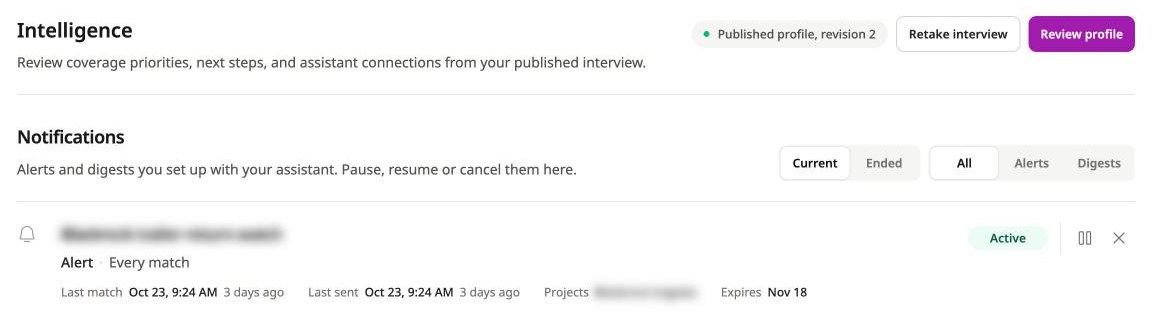
Live application screenshot, captured 26 October 2026. Customer names are blurred.
- Pause stops matching and sending, including deliveries already queued. Detections stored while a notification is paused are not replayed afterwards.
- Resume restores an active notification. It is refused if the notification has already expired or you already have the maximum number of active notifications. A digest's first edition after resuming covers everything since its last send.
- Cancel ends the notification permanently.
From an assistant
Listing notifications and delivery history is read-only. You can ask:
Using SiteTrax.io, list all my notifications with their IDs, titles, types, status, project scope and expiry. Include recent delivery statuses, expectation progress and the reporting windows for digests. Do not change anything.
Notification status can be active, paused, completed, cancelled or expired. Delivery history can show queued, sent, failed, suppressed or recorded entries; recorded entries are the silent arrivals of an expectation watch. A sent entry means the mail service accepted the message; it does not prove inbox delivery, opening or reading. A failed send is retried three times before it is marked failed. Project access and verified recipient status are checked again when notifications are processed.
To cancel from an assistant, give the exact notification ID, ask it to show the proposed cancellation, and confirm. The same cancellation tool applies to alerts, expectation watches and digests. Pausing and resuming are done in the application. To change a saved condition or schedule, cancel and create a replacement; there is no general edit command.
Limits and missing emails
Notifications expire after 30 days by default. Ask for the intended expiry explicitly and check the saved value; an expiry setting of zero means the 30-day default, not an indefinite subscription. An expectation watch stays open at least until its deadline. The current limit is 50 active notifications per user across all kinds; cancel an unused one if you reach it.
Notifications are processed asynchronously. A detection must be stored and matched before its email is queued, and a due digest or expectation deadline is picked up by the scheduled runner. Allow for ingestion, processing and mail-delivery delay rather than treating the selected time as an exact delivery guarantee.
If an email does not arrive, first inspect the notification and its delivery history. Check whether it is paused, expired, cancelled or completed, its filters, current project access, email verification, the digest timezone and selected days, repeating-alert suppression, and whether an interval digest simply had an empty result. An event alert needs a new matching detection; a digest needs a due schedule. Then check your inbox filters and contact support@sitetrax.io with the notification ID, expected time, and visible status. Never include credentials.
Workflows and Agents: What Runs Today
Start with the operational result and choose the smallest workflow that delivers it. An interactive answer, a saved notification and a custom agent are different levels of implementation.
| Job | Documented route | Boundary |
|---|---|---|
| Find when a unit was last seen | Interactive assistant query | A tool call retrieves an observation. It does not start ongoing monitoring. |
| Review activity or visit durations | Supported server-side analytics | Requires suitable records, scope and eligibility; incomplete visits remain distinct. |
| Tell me when a unit is observed again | Detection alert | Matches newly stored detections. Delivery is to your own verified account email. |
| Tell me when all expected units have arrived, or what is missing by a deadline | Expectation watch | Sends one email when every listed unit has a matching detection, or at the deadline listing the units still missing. |
| Send a regular activity breakdown | Scheduled or interval digest | Emails a saved query at a set time or every 15 to 1,440 minutes, including supported sequence and duration analysis. An optional AI-written summary sits above the result table. |
| Update another system or perform a business action | Separately scoped workflow or agent | Availability, runtime, external access and approval policy must be agreed. |
Example: find a trailer
Using SiteTrax.io, find the latest observation of trailer [complete identifier] at [project]. Show the recorded time and timezone, the project, the record link and any missing evidence.
Expected result: the last recorded observation and a way to check it. If there is no match, check the identifier, project access and time window before concluding the unit is absent.
Example: prepare a detection alert
Prepare a one-time alert for the next new detection of trailer [complete identifier] at [project], expiring in 30 days. Show the exact filter, recipient and expiry, then ask me to confirm before creating it.
Creating or cancelling a notification requires sitetrax:notifications:write in addition to read access. Listing notifications and delivery history uses read access. A saved notification ID confirms configuration; a delivery-history entry records dispatch status. Neither proves the email was read. You can pause, resume or cancel your notifications from the Intelligence screen in the application.
Example: scope an exception workflow
Design example, not a claim of an available packaged agent. Compare observed equipment with an expected list from a customer system, prepare an exception and route it to an operator for review. Agree the external source, identifier matching, freshness limit, approval step and destination before implementation. If you can supply the expected list yourself, an expectation watch already covers the arrival check; the custom work is connecting the customer system and routing the exception.
What to specify for a custom workflow
| Decision | Example |
|---|---|
| Trigger | New eligible observation, an agreed schedule, or an operator request. |
| Evidence | SiteTrax.io project, equipment family, time window and supporting records. |
| Business context | Expected list, contract or schedule supplied by an authorized system. |
| Action | Draft an exception for review, or an explicitly permitted system update. |
| Control | Who approves, what happens on missing evidence, and how duplicate actions are prevented. |
| Success measure | Time to answer, reviewed exceptions resolved, or time from observation to approved action. |
For exact alert types, schedules, metrics and limits, use Alerts and Scheduled Digests.