Introduction to SiteTrax.io Intelligence
Understand SiteTrax.io Intelligence: personal profile setup and coverage review in the application, plus authorized operational queries through connected assistants. Explore current capabilities, evidence and capture limitations, how data is shared with assistants, and the roadmap.
- What is SiteTrax.io Intelligence?
- Why Intelligence Matters
- How Intelligence Uses SiteTrax.io Data
- Core Intelligence Features
- Intelligence Roadmap Overview
- How SiteTrax.io Data, Workflows and Agents Fit Together
What is SiteTrax.io Intelligence?
SiteTrax.io Intelligence is the layer that uses SiteTrax.io operational data to answer questions, run supported workflows, and give connected AI assistants and agents access to the evidence behind their work. Start with a practical question: when was this trailer last seen, what activity was recorded at this site, or which observations need review?
SiteTrax.io creates the underlying data from camera captures. Intelligence makes that data useful in an operational task. Your chosen assistant interprets the request and uses authorized SiteTrax.io tools; SiteTrax.io retrieves the records and calculates supported analytics.
System architecture
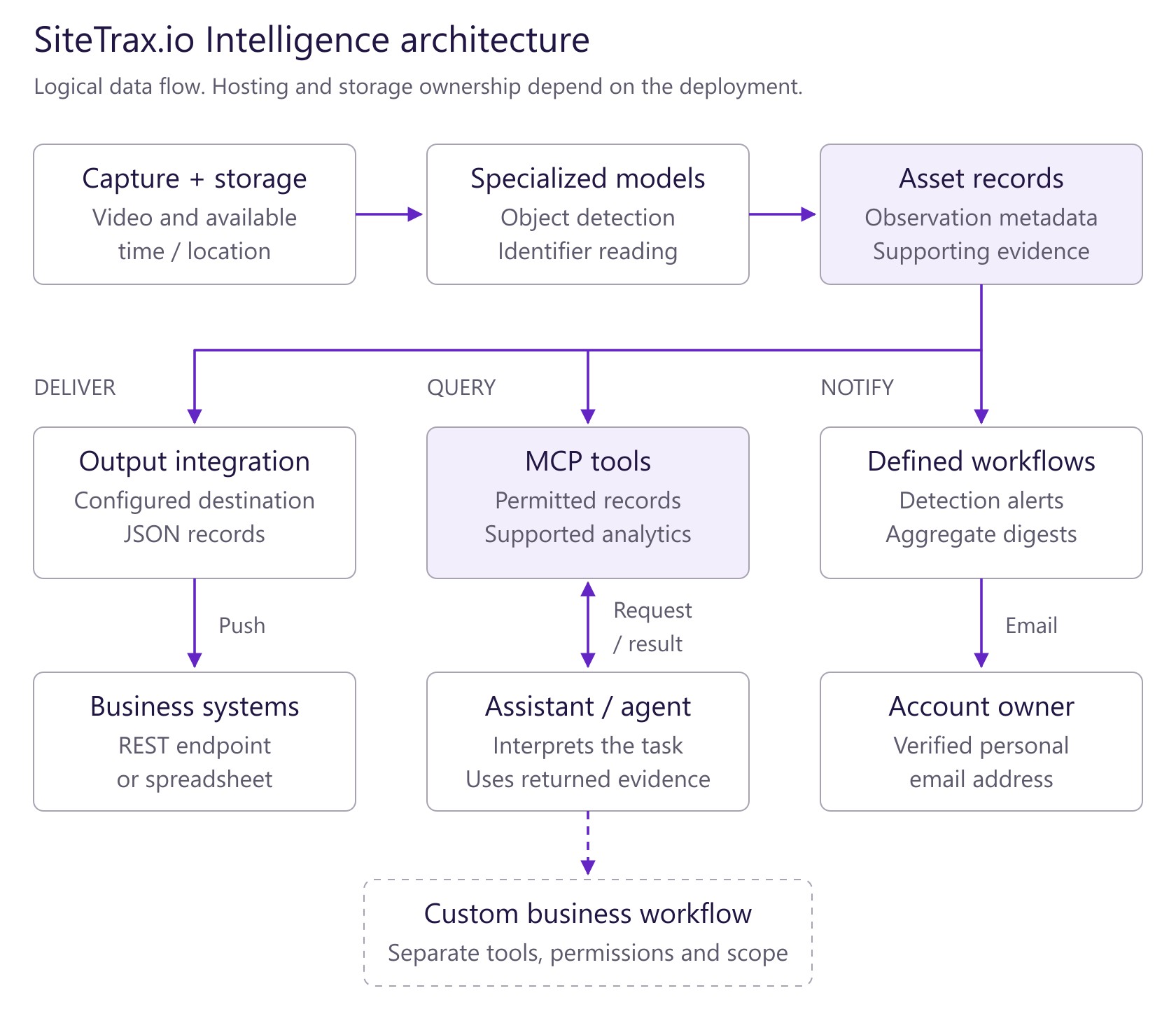
Open the architecture diagram at full size. Solid arrows show documented paths; dashed boxes and arrows show separately scoped workflows. These are logical responsibilities, not a claim about physical hosting.
SiteTrax.io’s specialized models extract identifiers from captured imagery. A connected assistant’s foundation model interprets the user’s task, requests permitted SiteTrax.io results and explains the evidence. Broader actions require their own workflow, tools and permissions.
From a physical observation to an operational result
| Layer | What happens | What you receive |
|---|---|---|
| Capture | A compatible camera or capture app records equipment. | Video and available capture time and location. |
| SiteTrax.io data | Specialized processing reads supported identifiers and stores the results. | Records containing identifier text, type, status and project, with timestamps and evidence where available. |
| Intelligence | SiteTrax.io tools retrieve observations, calculate supported measures and run supported notifications. | An answer, analysis, detection alert or scheduled digest within the documented limits. |
| Connected assistant or agent | A validated assistant or agent client calls permitted tools and explains their results. | A response tied to the projects your account can access. Additional business actions need their own integration and permissions. |
Choose the job you need done
- Find a unit: ask for its latest observation, time, site and supporting record.
- Understand activity: request counts, trends or eligible completed-visit durations with the filters and evidence.
- Watch for a new detection: create a supported alert to your verified account email, or an expectation watch that reports which listed units have not arrived by a deadline.
- Receive a routine summary: schedule a digest of a saved query, optionally with an AI-written summary.
- Act in another business system: define the trigger, destination and permitted action with SiteTrax.io before treating it as an available workflow.
Workflows and agents have different roles
A workflow follows defined steps and conditions. An agent uses a model to interpret a task and choose among tools it has permission to use. MCP is the connection through which a compatible assistant or agent discovers and calls SiteTrax.io tools. MCP itself is neither an AI model nor a background automation service.
Current documentation covers detection alerts, expectation watches, and scheduled or interval email digests. It does not establish a general-purpose service that autonomously updates your TMS, dispatches equipment, issues invoices or disputes charges. Those use cases require an agreed implementation.
Where you work
Use app.sitetrax.io to review records, configure projects and use the personalized Intelligence hub. Connect an assistant to ask operational questions in that assistant. Publishing a personal profile enables the normal personalized hub when Intelligence is enabled; it is optional for ordinary authorized MCP queries.
A profile supplies selected published facts and priorities. It does not automatically configure your assistant, activate monitoring or grant project access.
What makes an answer useful
Ask for the asset identifier, observation time and timezone, project, supporting record and any missing evidence. A latest observation tells you where a unit was seen at that time. Current presence requires adequate coverage and additional evidence. A stored result row is not necessarily one physical unit or one successful read.
Start with one verifiable answer
Follow the setup instructions in your provider’s dedicated section, then ask:
Using SiteTrax.io, list the projects I can access. Then help me find the latest observation of a trailer identifier I provide, with its timestamp, timezone, project and supporting record. Do not create or change anything.
For a custom workflow, contact SiteTrax.io with one operational problem, the site, the destination system and the action you want to take.
Continue with the right guide
- Start here: choose your task
- How data, workflows and agents fit together
- Workflow capabilities and implementation boundaries
Why Intelligence Matters

Captured yard and gate records are more useful when operators can find and compare them while a decision is still in front of them. Intelligence makes those records easier to query and shows where missing capture limits the answer.
The problems it addresses
| Everyday problem | What it costs | What Intelligence changes |
|---|---|---|
| Nobody can say where a unit is without walking the yard | Labour, delay, and a customer waiting on the phone | The last observation of an identifier is a lookup with its time, project and available image; it does not prove the unit is still there |
| Detention is billed and there is no way to check it | Charges paid that were never verified | Eligible gate-in and gate-out observations can support an inferred visit interval for invoice review; the applicable events, contract, free time, rate and exceptions still need verification |
| A dispute comes down to one party's recollection against another's | Write-offs and damaged relationships | Available timestamped observations and images help check the claimed movement |
| A KPI report takes a day to assemble | Reporting effort that crowds out operating | Totals and breakdowns are calculated on the server and returned on request |
| A camera stops producing and nobody notices for a week | A blind spot in the record exactly when it is needed | Recent camera activity and volume-gap checks identify a period to investigate; a gap alone does not prove hardware failure |
Why trusted data is the point
An assistant can ground an answer in the SiteTrax.io records your account is allowed to read. Times, projects, result types, status codes and available images make those records reviewable. Some processing rows are synthetic or contain unsuccessful reads, and media can be missing or redacted, so evidence should be checked before using it in a dispute or invoice review.
Supported analytics report relevant limits, such as incomplete pairings, capped result lists or an unavailable calculation. Inferred visits remain estimates derived from eligible observations and stated pairing rules. Ask the assistant to explain missing data and uncertainty rather than treating an observation gap as a confirmed movement.
Who gets value from it
- Gate staff review captured arrivals and departures using the site's direction configuration.
- Yard supervisors review recent observations and inferred visits, with capture and pairing limits stated.
- Customer service finds the last recorded location and time without leaving their desk.
- Operations managers compare volume and dwell across sites and periods.
- Finance and executives get counts they can defend, drawn from the same records the yard works from.
How Intelligence Uses SiteTrax.io Data
Intelligence reads the records SiteTrax.io already stores and returns operational results scoped to the projects your account is permitted to see. The native hub uses your published profile for personal guidance. A connected assistant can retrieve selected published facts and priorities when relevant to a request.
System architecture
Open the architecture diagram at full size. Solid arrows show documented paths; dashed boxes and arrows show separately scoped workflows. These are logical responsibilities, not a claim about physical hosting.
SiteTrax.io’s specialized models extract identifiers from captured imagery. A connected assistant’s foundation model interprets the user’s task, requests permitted SiteTrax.io results and explains the evidence. Broader actions require their own workflow, tools and permissions.
The chain from camera to answer
- Capture. A camera or capture app records video at a gate, in a yard, or on a route.
- Processing. SiteTrax.io processes the capture and stores asset/result rows with identifier text, emitted type and status code. Some rows represent failed reads or a synthetic missing side of a container/chassis pair, rather than an independently identified unit.
- The record. A record contains stored identifier text, type, project and processing status, with scan time, camera, heading, coordinates, confidence and media links where available. Direction requires the relevant heading or site designation, and retention or redaction can withhold media.
- Intelligence. Aggregations, sequences and exception checks are calculated on the server. An assistant can request published profile context separately when it helps answer your question.
- Delivery. The result is shown in the application, or returned through the MCP server to the assistant provider you connected. Query-time access avoids a separate bulk synchronized index; it still sends the requested results to that provider.
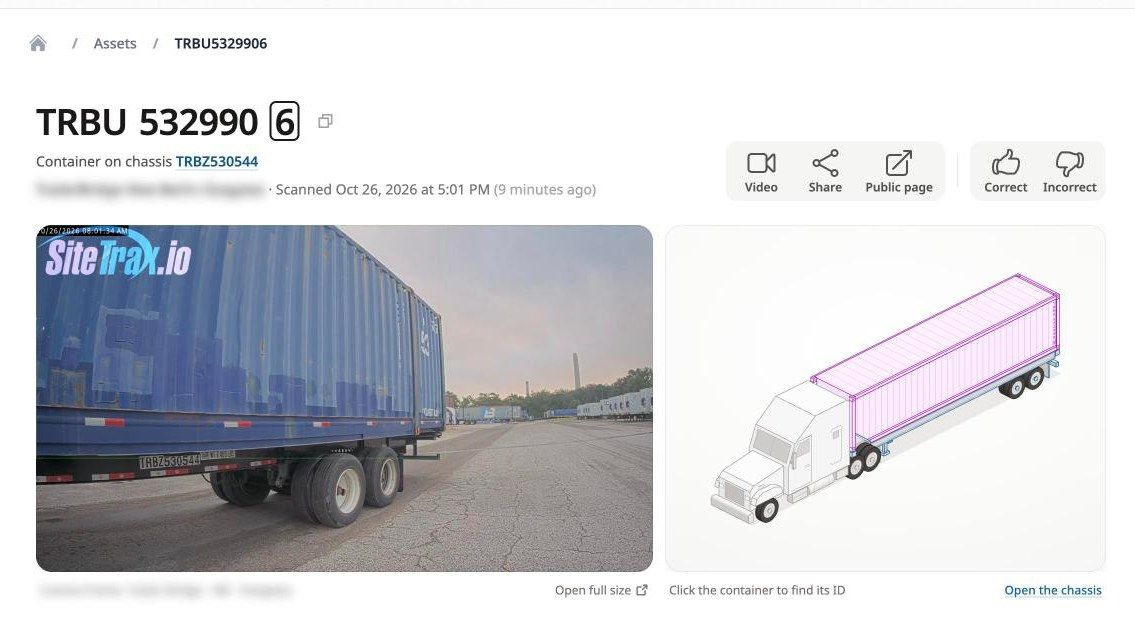
How to read an asset record
For a full equipment history, confirm both the complete identifier and the equipment type. Text search can find partial matches, and the same text can occur in different equipment families.
Reading these records correctly matters more than any single feature, because a misread record produces a confident wrong answer.
- One record is one stored processing result. It is not guaranteed to be one physical asset or one direct observation. Where container and chassis processing are combined, SiteTrax.io can add a synthetic row for the paired side.
- Identifier text is only usable when it is real text. Blank values and placeholders such as a single dash are not equipment identifiers and must not be treated as one.
- Status code and asset type must be read together. A processing status describes the outcome of reading the image. It is not by itself a statement about the physical condition of the unit.
- Counts mean what they say. A count of records is not the same as a count of distinct units, and a count of distinct identifier values is not a guarantee of distinct equipment.
- Direction is configuration-dependent. It can describe movement derived from a record's heading and stored direction mapping, or the designated role of a project or camera. Ask which interpretation was used. Vertical or missing headings do not establish heading-derived entry or exit.
Common status interpretations
Read status and emitted asset type together. These examples describe processing outcomes and do not independently establish an operational incident.
| Code | What it means |
|---|---|
| A0 | An accepted read under the processing rules; not independently verified accuracy. |
| I1 / I2 | A container owner-prefix warning / a failed container check-digit check. |
| I3 | No usable identifier was read. This does not prove physical damage. |
| I4 | A readable chassis or USDOT identifier was absent from the supplied asset list. The identifier is not necessarily invalid. |
| I5 | A synthetic missing container or chassis side of a combined pair, rather than a separately observed unit. |
| I6 | A low-confidence result that otherwise met the acceptance rules. |
| I7 | A configured text substitution changed the identifier after processing. Legacy display text may misleadingly describe it as low confidence. |
| - | Generic OCR has no semantic status classification; the dash is not automatically a warning. |
Dates and evidence
Asset analysis uses scan time when present and falls back to record creation time for older records. Video analysis uses video creation time. Ordinary MCP date filters use UTC-midnight business-day boundaries; a grouping timezone changes the displayed time buckets. Sequence analysis can instead use exact timezone-aware start and end timestamps for local calendar periods. State the requested timezone and check the resolved boundaries in the answer.
Your profile as context
When you publish the profile interview, SiteTrax.io stores an immutable revision and generates a working brief for review in the application. The public MCP profile tool returns selected facts and priorities from your latest published revision. Available sections include organization, operations, inferred user timezone, confirmed tailored answers and the accessible projects from the publication snapshot. It does not return the working brief, custom AI instructions or response-style preferences.
Custom AI instructions and response preferences can be saved in your profile, but saving them does not configure a connected assistant. Ask for the desired tone or level of explanation in that assistant. Profile retrieval and use depend on the assistant and the question. Your published answers remain customer-supplied context, not independently verified operational or contractual evidence. A saved free-time allowance or rate alone does not establish a payable charge.
Publishing also snapshots the projects covered by that revision. Profile retrieval keeps only snapshotted projects you can still access; newly shared projects are not automatically added to the old publication. Reopen and republish when the intended profile scope changes. If no projects remain accessible, or the returned profile list is incomplete, the assistant must make that limitation clear rather than silently querying all shared projects.
Scope and permissions
For an operational question, explicitly name the projects you want analyzed. A profile provides context, while each data request has its own project selection. Omitted project filters normally mean all projects currently shared with the authenticated account.
Every operational request is limited to the projects currently shared with the authenticated account. Connecting an assistant does not widen SiteTrax.io permissions. Projects selected in a profile describe context; they are not a separate OAuth project grant. Current project sharing remains the access limit. See Account access and OAuth.
The profile belongs to a specific user account. If you publish a profile in the application but connect an assistant using a different SiteTrax.io account, that assistant will not see the profile. Use the same account on both sides.
Core Intelligence Features

The application at app.sitetrax.io provides the profile interview, published revisions, coverage review and operational screens. A connected assistant uses the SiteTrax.io MCP server to query authorized data and perform the supported notification actions described below.
Profile interview
A short interview records who you are, the work you do, your goals, where you need visibility, other data you hold, operating costs and response preferences. Operating details can depend on the cost areas you select. Follow the questions shown for your account, and leave unknown figures unanswered rather than inventing a rate or baseline.

Published profile revisions
Publishing creates an immutable revision. You can reopen and republish without replacing the history, and your published profile stays active while an edit is in progress. Only answers you explicitly confirmed are included; account-prefilled display values are not silently promoted into stored facts.
Working brief
A short summary of your published answers, stored with the revision and shown in the application. A connected assistant can retrieve a compact selection of published facts and priorities when relevant. The public MCP profile response excludes the working brief, custom AI instructions and response-style preferences. Publication does not guarantee that an assistant retrieves or applies your context.
Coverage review
The Intelligence hub shows guidance for supported visibility priorities from your interview, with a status on each card. Gate pairing is checked against the projects in your published scope. These cards help identify missing configuration or inputs; they do not certify that every movement was captured or that a contractual charge is due.
Assistant connections
The hub provides assistant setup entry points. A card opens setup but does not confirm installation or successful OAuth authorization. Complete your provider’s dedicated setup section, then verify access by asking the assistant to list the projects your account can access. A published profile is optional for ordinary MCP queries.
Operational data surfaces
- Dashboard for volume, asset and scan totals over a period and project.
- Videos for the recordings behind the readings, with the asset count found in each.
- Assets for the gallery of readings, with an exceptions filter.
- Projects for site configuration, user access and integrations.
Record feedback
Each asset record can be marked correct or incorrect from its detail page in the application. A connected assistant can read saved audit feedback for an exact record and retrieve its supporting observation. Submitting or changing record feedback remains an application action.
Server-side analytics
Counts, groupings, sequence analysis and anomaly checks are calculated by SiteTrax.io. Compare stored results or distinct recorded identifiers by project, camera, asset type, status and time. These are different measures: a result row or a distinct identifier is not automatically one physical unit or one gate passage. An assistant can request supported aggregates and then retrieve supporting records or inferred visits for explanation. Results are returned to the chosen assistant provider.
Sequence analysis supports two to eight ordered observation stages for one equipment family at a time: containers, chassis or trailers. With defined boundaries and a suitable maximum visit duration, it can return completed-visit counts, average and median duration, percentiles such as p90, and time between stages. It also reports incomplete and ambiguous observations. Occupancy-versus-duration analysis describes an observed association under those assumptions; it does not establish the cause of a delay.
Camera health summarizes recorded activity, status distributions and first/last observations. The review queue and anomaly checks help prioritize investigation; low activity does not prove an outage, and an A0 success-code share is not a measurement of OCR accuracy.
Alerts and scheduled digests
A connected assistant can create a watch for new matching detections, an expectation watch for a list of units due by a deadline, or a scheduled or interval email digest of a saved query, optionally with an AI-written summary above the result. It can also cancel an existing notification. Creating and cancelling need your confirmation and the additional notification-write permission. The Intelligence screen in the application lists your notifications and lets you pause, resume or cancel them. Delivery is to your own verified account email. Listing notifications and reading delivery history require read permission only. See Alerts and scheduled digests for supported conditions, schedules and limits.
Asset insights
Each asset record in the application includes a fact sheet computed by SiteTrax.io: read status, check digit and registered owner, detection details, tracking, pairing, earlier sightings in the project and reviewer feedback. On request, a language model writes a short insight from those facts alone, after you agree once to AI processing. See Asset detail.
Reference and research
Intelligence includes a curated library of SiteTrax.io product guidance and sourced logistics terminology. Reference material explains concepts; current records come from operational tools. Compatible research assistants can also search shared projects, matching equipment records, selected aggregate reports and reference entries, then retrieve the details behind a returned result. Assistant support for research and citations varies by platform.
Intelligence Roadmap Overview
Use this page to distinguish documented Intelligence capabilities from a workflow that still needs implementation. Provider-specific availability belongs in each provider’s dedicated section.
Documented capabilities
- Operational record review and supported server-side analytics.
- Authorized assistant access to shared projects.
- Personal profile publication and native coverage guidance.
- Detection alerts, expectation watches, and scheduled or interval email digests of saved queries, with optional AI-written summaries, the required permission and confirmation. Notifications can be paused, resumed and cancelled in the application.
- AI insights on individual asset records, after the user agrees to AI processing.
Requires a defined implementation
A workflow that combines another business system with SiteTrax.io evidence, or performs downstream actions, needs an agreed scope. Confirm the trigger, data sources, runtime, permissions, approvals, support owner and acceptance criteria. The presence of an MCP connection does not establish an autonomous business workflow.
Connection availability
Use the dedicated provider sections for release status, setup and platform limits. A changed hub label does not by itself verify availability or authorization.
Reviewed 26 October 2026 against published documentation. This page makes no release-date commitment. Contact SiteTrax.io for implementation scope and availability.
How SiteTrax.io Data, Workflows and Agents Fit Together
Two flows answer different needs: SiteTrax.io can push processed data to a configured destination, and a connected assistant can request authorized information when a user asks a question. Enabling one flow does not configure the other.
System architecture
Open the architecture diagram at full size. Solid arrows show documented paths; dashed boxes and arrows show separately scoped workflows. These are logical responsibilities, not a claim about physical hosting.
SiteTrax.io’s specialized models extract identifiers from captured imagery. A connected assistant’s foundation model interprets the user’s task, requests permitted SiteTrax.io results and explains the evidence. Broader actions require their own workflow, tools and permissions.
Capture and create data
A compatible camera or capture app records equipment. The documented video-ingestion route uses configured object storage. Follow the storage-provider section for the supported service and upload requirements. SiteTrax.io processes the capture with its specialized detection and identifier-reading models, then stores operational results. The foundation model in your assistant is not required to perform this identifier extraction.
Push data to an existing system
Configured project integrations can send output to a spreadsheet, a REST endpoint or an integration platform. This is a data-delivery route. Your receiving application decides how to use it. See Organization Configuration and API Output (JSON).
Ask an assistant to retrieve and explain data
- You ask a question in a connected assistant.
- The assistant calls SiteTrax.io tools through the remote MCP endpoint.
- SiteTrax.io applies the authenticated account’s project permissions and the requested filters.
- SiteTrax.io retrieves records or calculates a supported aggregate.
- The authorized result returns to the assistant provider for the response.
SiteTrax.io remains the source of the operational record. Query-time access sends the returned data to the chosen provider; it is not a promise that data stays entirely within a customer cloud. The deployed endpoint uses Streamable HTTP and OAuth. See MCP Server.
Run a workflow
Documented built-in notification workflows watch for new matching detections, check that a list of expected units arrives by a deadline, or send a saved query on a schedule or interval, optionally with an AI-written summary. A broader workflow that reads another system, evaluates a business rule and writes a result needs separate design and authorization. Choose the runtime, credentials, approval rules and support owner before deployment.
Confirm responsibility before implementation
| Component | Responsibility to establish |
|---|---|
| Camera and site | Customer and SiteTrax.io agree coverage, installation and support responsibilities. |
| Raw capture storage | Confirm whether the bucket is customer-managed or SiteTrax-managed, plus access, retention and cost. |
| SiteTrax.io processing and records | SiteTrax.io supplies its processing service, records, supported analytics and access controls. |
| Assistant | Customer selects an approved provider and account. Provider policies govern its handling of returned results. |
| Custom workflow runtime | Name the cloud project owner, billing owner and support owner in the implementation scope. |
| External write actions | Name the destination, permitted actions, approval rule, audit record and failure recovery. |
Data ownership, hosting location, access permissions and provider data handling are separate questions. A cloud provider’s certifications do not by themselves certify a SiteTrax.io deployment.